> ## Documentation Index
> Fetch the complete documentation index at: https://docs.min-ai.ar/llms.txt
> Use this file to discover all available pages before exploring further.
# Agents
> What a minai agent is, the difference between a personal one and a group one, and what each one has.
An **agent** is an AI helper with its own name, face and color. It has one conversation that never ends, a memory where it writes down what it learns about you, its own tools (plugins) and its scheduled tasks. You can have several, each for one thing: one for your calendar, another for your work, another for the family.
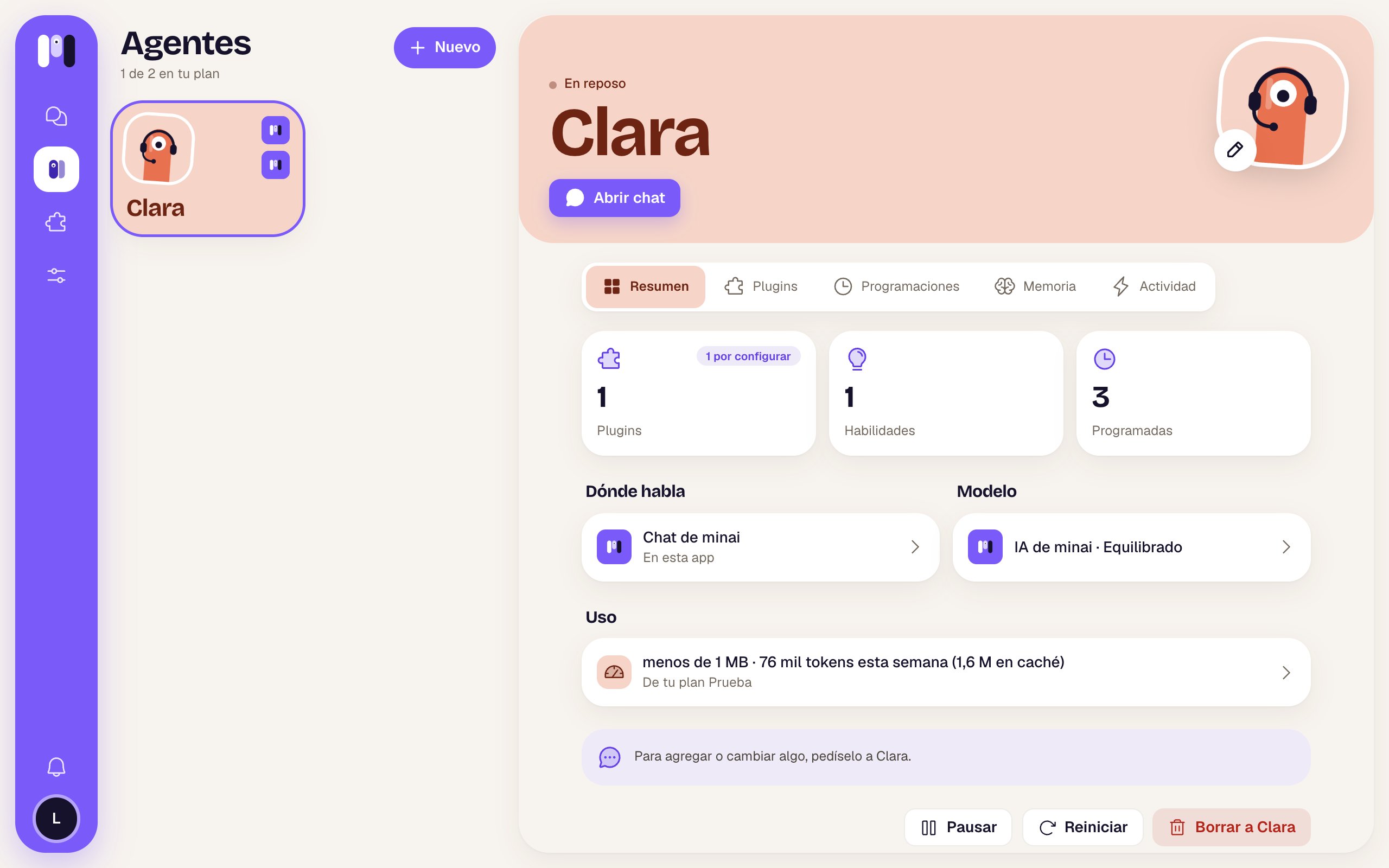 ## What each agent has
| | |
| - | - |
| **Name and face** | You pick one of minai's faces, in the color you like, or upload an image of your own. |
| **A channel** | Where you talk to it: minai's chat, Telegram, WhatsApp or Slack. One per agent. |
| **An AI and a level** | What it thinks with (Claude, ChatGPT, your API or minai's AI) and how powerful it is. |
| **Plugins** | The tools it knows how to use: your email, your calendar, your bank, GitHub… |
| **Schedules** | What it does on its own, at its set time: reminders, summaries, checks. |
| **Memory** | What it knows about you and what it has learned along the way. |
| **Its own space** | A folder of its own where it keeps files, installs programs and works. |
## For you or for a group
When you create it, you choose who it's for. **This can't be changed later.**
Only you talk to it, on Telegram, WhatsApp, Slack or minai's chat. It can use personal plugins, like your WhatsApp, your email or your bank.
The whole group talks to it, on Telegram, WhatsApp or Slack. It listens to everyone equally and keeps track of who's who. It doesn't use personal plugins.
See more in [Group agents](/en/reference/channels/groups).
## What it's for: the templates
When you create it, you pick a starting point. It sets how the agent starts and what it asks you in your first chat; after that, you can ask it for anything.
| Template | What for |
| - | - |
| **Personal assistant** | Calendar, reminders, emails and whatever you need day to day. |
| **Developer** | Writes and reviews code, works with your repos and explains what it does. |
| **DevOps** | Looks after your servers and services: checks, deploys and alerts. |
| **From scratch** | An agent with no specialty: you tell it what it's for. |
You can change its role anytime, just by saying so: "From now on you're my sales assistant."
## You set it up by chatting
A newly created agent writes to you first, introduces itself and asks you a few questions: what you'd like it to call you, your schedule, what you need first. It writes the answers down in its memory. From then on, anything you want to change (a time, a new tool, how it talks to you) you ask it.
The web app is for looking and for a few adjustments only you can make: changing its name, channel or model, pausing it, restarting it, deleting it, adding or removing plugins and turning on their permissions.
## Its states
* **Working now**: it's doing something (answering you or running a schedule).
* **Idle**: waiting. It wakes up on its own when you write to it or when a schedule is due.
* **Paused**: you paused it. It doesn't answer or run its schedules until you resume it.
## Keep reading
Step by step, with every option.
Name, face, channel, model, pausing and deleting.
This documentation is built and hosted on [Mintlify](https://mintlify.com), a developer documentation platform.
## What each agent has
| | |
| - | - |
| **Name and face** | You pick one of minai's faces, in the color you like, or upload an image of your own. |
| **A channel** | Where you talk to it: minai's chat, Telegram, WhatsApp or Slack. One per agent. |
| **An AI and a level** | What it thinks with (Claude, ChatGPT, your API or minai's AI) and how powerful it is. |
| **Plugins** | The tools it knows how to use: your email, your calendar, your bank, GitHub… |
| **Schedules** | What it does on its own, at its set time: reminders, summaries, checks. |
| **Memory** | What it knows about you and what it has learned along the way. |
| **Its own space** | A folder of its own where it keeps files, installs programs and works. |
## For you or for a group
When you create it, you choose who it's for. **This can't be changed later.**
Only you talk to it, on Telegram, WhatsApp, Slack or minai's chat. It can use personal plugins, like your WhatsApp, your email or your bank.
The whole group talks to it, on Telegram, WhatsApp or Slack. It listens to everyone equally and keeps track of who's who. It doesn't use personal plugins.
See more in [Group agents](/en/reference/channels/groups).
## What it's for: the templates
When you create it, you pick a starting point. It sets how the agent starts and what it asks you in your first chat; after that, you can ask it for anything.
| Template | What for |
| - | - |
| **Personal assistant** | Calendar, reminders, emails and whatever you need day to day. |
| **Developer** | Writes and reviews code, works with your repos and explains what it does. |
| **DevOps** | Looks after your servers and services: checks, deploys and alerts. |
| **From scratch** | An agent with no specialty: you tell it what it's for. |
You can change its role anytime, just by saying so: "From now on you're my sales assistant."
## You set it up by chatting
A newly created agent writes to you first, introduces itself and asks you a few questions: what you'd like it to call you, your schedule, what you need first. It writes the answers down in its memory. From then on, anything you want to change (a time, a new tool, how it talks to you) you ask it.
The web app is for looking and for a few adjustments only you can make: changing its name, channel or model, pausing it, restarting it, deleting it, adding or removing plugins and turning on their permissions.
## Its states
* **Working now**: it's doing something (answering you or running a schedule).
* **Idle**: waiting. It wakes up on its own when you write to it or when a schedule is due.
* **Paused**: you paused it. It doesn't answer or run its schedules until you resume it.
## Keep reading
Step by step, with every option.
Name, face, channel, model, pausing and deleting.
This documentation is built and hosted on [Mintlify](https://mintlify.com), a developer documentation platform.