> ## Documentation Index
> Fetch the complete documentation index at: https://docs.min-ai.ar/llms.txt
> Use this file to discover all available pages before exploring further.
# Channels
> Where you talk to each agent: minai's chat, Telegram, WhatsApp or Slack.
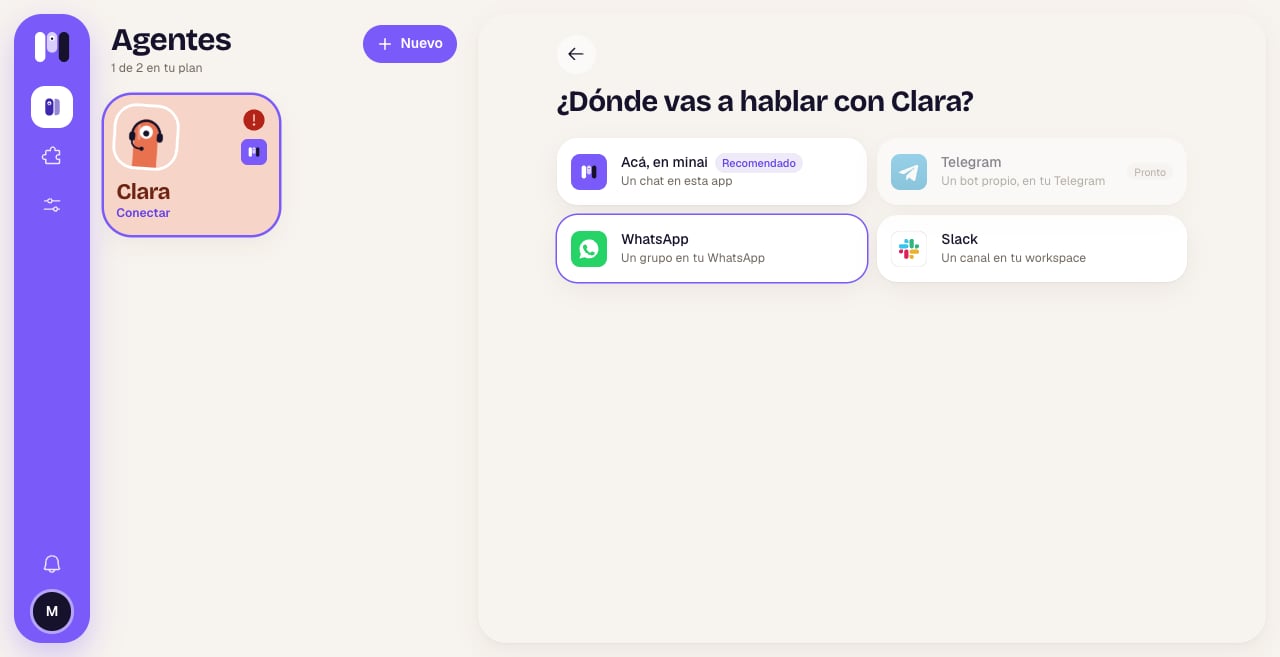
The **channel** is where you talk to an agent. Each agent has one: you choose it when you create the agent and, if it's a personal one, you can change it later without losing anything.
A chat in the minai app. You don't need anything else. It's the most complete one: buttons, tables, voice messages, and you see what the agent is doing.
A bot of its own, in your Telegram, with the agent's name and face. minai creates it for you.
A group in your WhatsApp with the agent in it. You write to it from your usual WhatsApp.
A private channel in your Slack workspace for each agent.
 ## Which one suits me?
* **To get started**, minai's chat: there's nothing to connect and your agent writes to you within seconds.
* **If you live on WhatsApp or Telegram**, put your agents there: they write to you like any other contact.
* **For work**, Slack: each agent has its own channel in the team's workspace.
* **For a group** (the family, a team), Telegram, WhatsApp or Slack: minai's chat is just for you.
The full table, with what changes in each one: [Channel comparison](/en/reference/channels/comparison).
## What's the same everywhere
* **The agent writes to you first** when you connect it.
* **Files, photos and voice messages** go back and forth. The voice messages you send it are turned into text automatically.
* **Choices**: when the agent gives you options, in minai, Telegram and Slack you see buttons; in WhatsApp, a numbered list.
* **To stop it** in the middle of a task, send `/stop` (in minai you also have the stop button).
* **All your chats can be read in minai**: the **Chats** tab also shows the ones from Telegram, WhatsApp and Slack. You answer those over there.
## Your WhatsApp number isn't a channel
To talk to an agent on WhatsApp, the agent needs its own number (a minai line or another one of yours), and it creates a group with you. Your personal number can't be the agent's.
A different thing is an agent **reading your WhatsApp** (your chats, to search and sum up): that's the [WhatsApp plugin](/en/plugins/whatsapp).
## Changing channels
A personal agent can move to another channel whenever you like: it takes its conversation, memory, plugins and schedules with it. See [Change an agent](/en/setup/change-an-agent#change-channel).
This documentation is built and hosted on [Mintlify](https://mintlify.com), a developer documentation platform.
## Which one suits me?
* **To get started**, minai's chat: there's nothing to connect and your agent writes to you within seconds.
* **If you live on WhatsApp or Telegram**, put your agents there: they write to you like any other contact.
* **For work**, Slack: each agent has its own channel in the team's workspace.
* **For a group** (the family, a team), Telegram, WhatsApp or Slack: minai's chat is just for you.
The full table, with what changes in each one: [Channel comparison](/en/reference/channels/comparison).
## What's the same everywhere
* **The agent writes to you first** when you connect it.
* **Files, photos and voice messages** go back and forth. The voice messages you send it are turned into text automatically.
* **Choices**: when the agent gives you options, in minai, Telegram and Slack you see buttons; in WhatsApp, a numbered list.
* **To stop it** in the middle of a task, send `/stop` (in minai you also have the stop button).
* **All your chats can be read in minai**: the **Chats** tab also shows the ones from Telegram, WhatsApp and Slack. You answer those over there.
## Your WhatsApp number isn't a channel
To talk to an agent on WhatsApp, the agent needs its own number (a minai line or another one of yours), and it creates a group with you. Your personal number can't be the agent's.
A different thing is an agent **reading your WhatsApp** (your chats, to search and sum up): that's the [WhatsApp plugin](/en/plugins/whatsapp).
## Changing channels
A personal agent can move to another channel whenever you like: it takes its conversation, memory, plugins and schedules with it. See [Change an agent](/en/setup/change-an-agent#change-channel).
This documentation is built and hosted on [Mintlify](https://mintlify.com), a developer documentation platform.