> ## Documentation Index
> Fetch the complete documentation index at: https://docs.min-ai.ar/llms.txt
> Use this file to discover all available pages before exploring further.
# Your AI and the models
> What your agents think with: your Claude or ChatGPT subscription, your own API or minai's AI, and the four levels.
Your agents think with an **AI** that you connect. minai doesn't charge you separately for the AI: it uses yours. Then each agent chooses which one it thinks with and at what **level**.
## The three sources
The cheapest option: your agents think with your **Claude** (Pro or Max) or **ChatGPT** (Plus or Pro) account and use your subscription's quotas. You can connect both.
You pay for what you use, with your account at the provider: **OpenAI**, or **OpenRouter** with the **DeepSeek**, **Kimi** and **Qwen** families. You paste your key once; minai tests it and stores it encrypted.
To start right away, with no subscription or key: minai provides the AI while your free trial lasts. It only shows up during the trial.
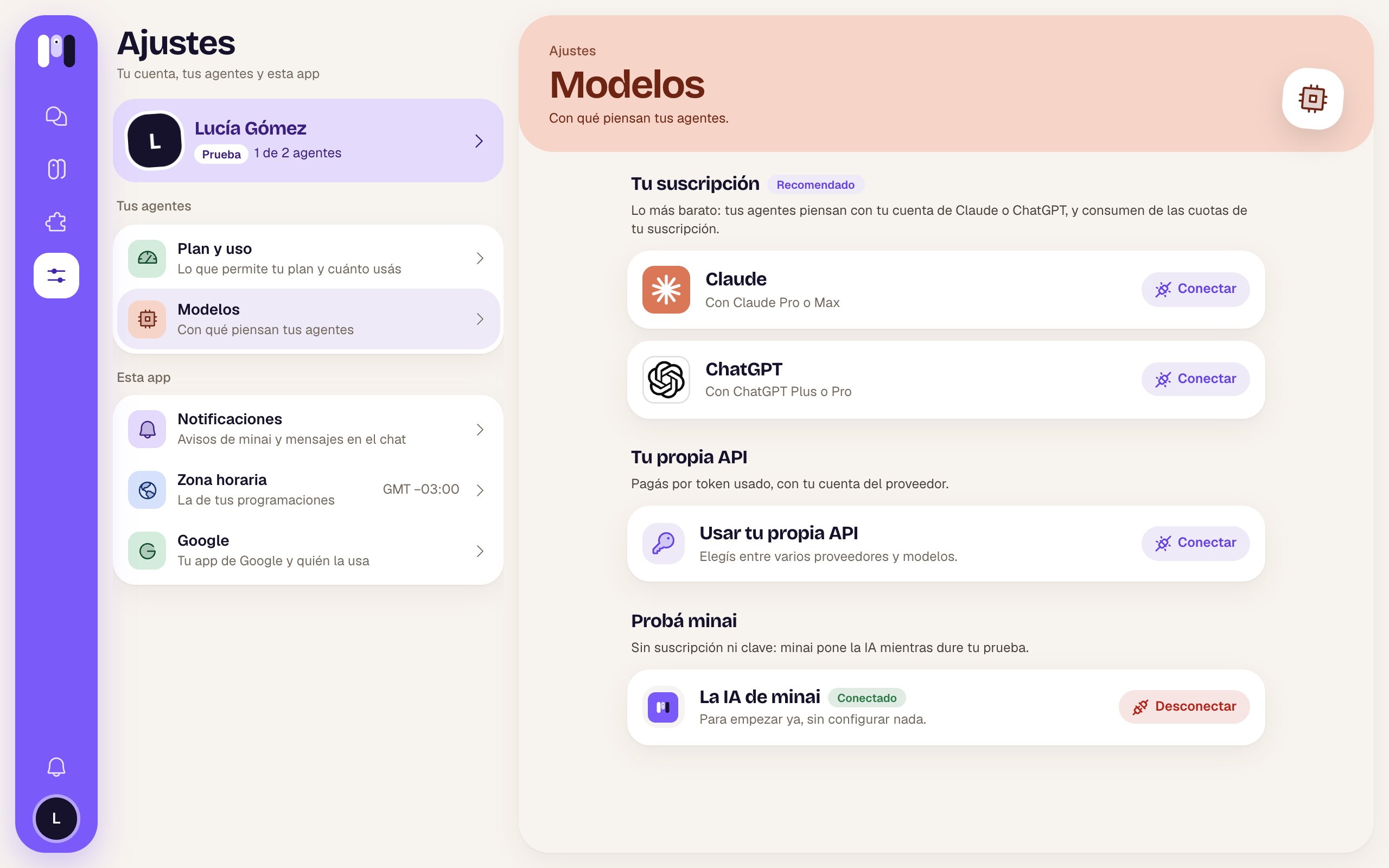 The sources can live side by side: you can have Claude and ChatGPT connected and have each agent use a different one. The only exception: **your own API** and **minai's AI** can't be connected at the same time.
How to connect each one: [Connect your AI](/en/setup/connect-your-ai).
## The four levels
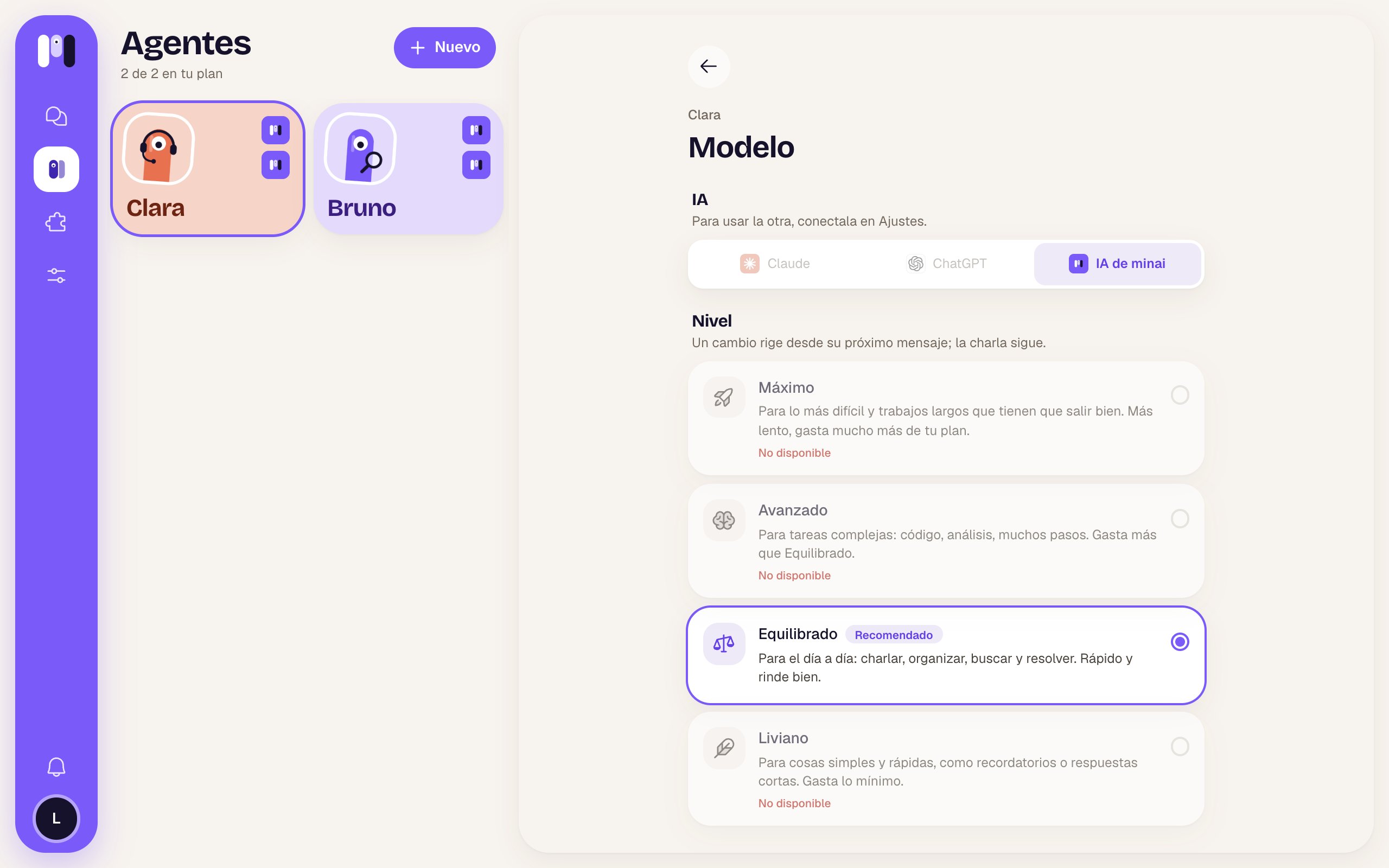
You don't pick a specific model: you pick a **level**, and minai runs it with the model that works best for it on your AI. The models behind each level may change over time, as better ones come out.
| Level | What for |
| - | - |
| **Maximum** | For the hardest things and long jobs that have to go right. Slower, uses much more of your plan. |
| **Advanced** | For complex tasks: code, analysis, many steps. Uses more than Balanced. |
| **Balanced** (recommended) | For every day: chatting, organizing, looking things up and getting them done. Fast and goes a long way. |
| **Light** | For simple, quick things, like reminders or short answers. Uses the least. |
Not every AI offers all four levels. The ones that aren't available show as **Not available**.
The sources can live side by side: you can have Claude and ChatGPT connected and have each agent use a different one. The only exception: **your own API** and **minai's AI** can't be connected at the same time.
How to connect each one: [Connect your AI](/en/setup/connect-your-ai).
## The four levels
You don't pick a specific model: you pick a **level**, and minai runs it with the model that works best for it on your AI. The models behind each level may change over time, as better ones come out.
| Level | What for |
| - | - |
| **Maximum** | For the hardest things and long jobs that have to go right. Slower, uses much more of your plan. |
| **Advanced** | For complex tasks: code, analysis, many steps. Uses more than Balanced. |
| **Balanced** (recommended) | For every day: chatting, organizing, looking things up and getting them done. Fast and goes a long way. |
| **Light** | For simple, quick things, like reminders or short answers. Uses the least. |
Not every AI offers all four levels. The ones that aren't available show as **Not available**.
 ## Changing level or AI
* **Changing the level** is instant and the conversation goes on: it applies from its next message.
* **Changing the AI** (for example, from Claude to ChatGPT) starts a new conversation: it keeps a summary of the latest things you talked about. It keeps its memory, plugins, keys and schedules, and writes to you to let you know.
See [Change an agent](/en/setup/change-an-agent#model).
## When your quota runs out
If you use your Claude or ChatGPT subscription, your agents use up its quotas (the 5-hour one and the weekly one). You can see them in **Settings → Plan and usage → Your subscription**, and minai lets you know when you reach 80% and 95%.
If it runs out, the agents that think with that AI can't work until it renews: minai answers you on their behalf saying when they'll be back, and any schedules that fall in that window are skipped.
To make your quota last, use **Light** for agents that do simple things (reminders) and save **Maximum** for the ones that really need it.
This documentation is built and hosted on [Mintlify](https://mintlify.com), a developer documentation platform.
## Changing level or AI
* **Changing the level** is instant and the conversation goes on: it applies from its next message.
* **Changing the AI** (for example, from Claude to ChatGPT) starts a new conversation: it keeps a summary of the latest things you talked about. It keeps its memory, plugins, keys and schedules, and writes to you to let you know.
See [Change an agent](/en/setup/change-an-agent#model).
## When your quota runs out
If you use your Claude or ChatGPT subscription, your agents use up its quotas (the 5-hour one and the weekly one). You can see them in **Settings → Plan and usage → Your subscription**, and minai lets you know when you reach 80% and 95%.
If it runs out, the agents that think with that AI can't work until it renews: minai answers you on their behalf saying when they'll be back, and any schedules that fall in that window are skipped.
To make your quota last, use **Light** for agents that do simple things (reminders) and save **Maximum** for the ones that really need it.
This documentation is built and hosted on [Mintlify](https://mintlify.com), a developer documentation platform.