> ## Documentation Index
> Fetch the complete documentation index at: https://docs.min-ai.ar/llms.txt
> Use this file to discover all available pages before exploring further.
# WhatsApp
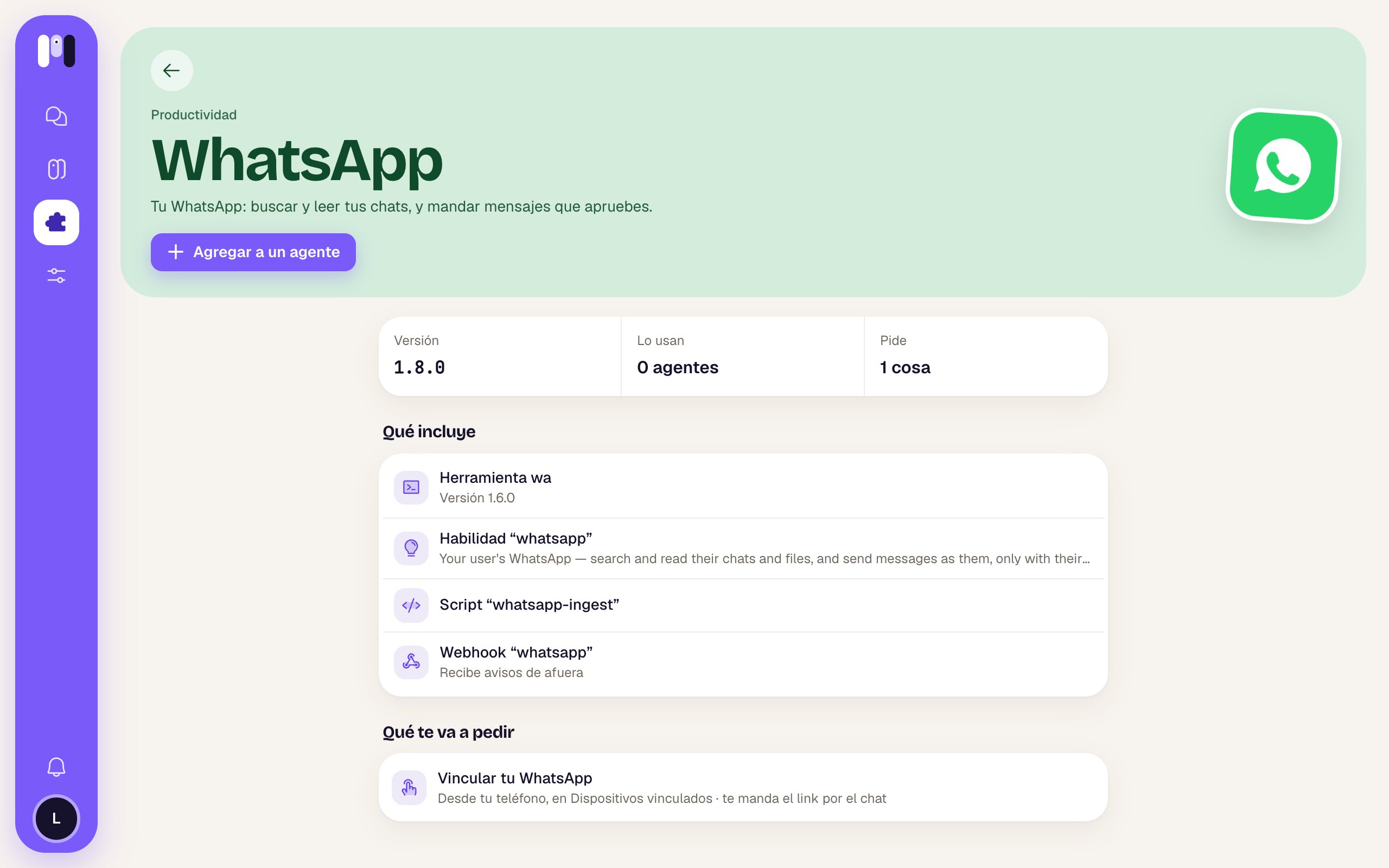
> Your agent searches and reads your WhatsApp chats, sums up what was said and sends the messages you approve.
 With WhatsApp, your agent can read and search your chats, sum up a group for you, find that message with the CBU (bank account number) and download a file someone sent you. If you ask it to reply, it shows you the message and only sends it with your OK.
| | |
| - | - |
| **Category** | Productivity |
| **For** | Personal agents (it can't be added to a group agent) |
| **What it asks for** | Linking your WhatsApp from your phone |
| **How it connects** | With a link your agent sends you, by scanning a QR code or with a code |
This plugin lets your agent read **your** WhatsApp. If what you want is to talk to your agent over WhatsApp, that's a channel: see [Channels](/en/concepts/channels).
## What it can do
See your recent chats, search messages (by words, by chat, from a date), read a conversation and download photos or documents people sent you. What you sent shows up as “me”.
Send a message to a chat, or reply to a specific message. Only the text you approved.
Times are shown in your time zone. New messages are saved on their own, so it's always up to date.
## How it connects
From **Plugins → WhatsApp → Add to an agent**, or ask your agent in the chat. See [Add a plugin](/en/tools/add-a-plugin).
Your agent writes to you in its chat with a one-time link. The page tells you that your agent will be able to read your chats and send the messages you approve.
On your phone, open WhatsApp → **Linked devices** → **Link a device** and scan the QR code. If you can't scan it (say, you opened the link on that same phone), use **Link with phone number** and type the code the page shows you.
The page confirms that your agent now has your WhatsApp, with your number. Your history takes a few minutes to load; then your agent tells you in the chat what it can do.
You don't have to type any password: minai keeps the connection for you.
With WhatsApp, your agent can read and search your chats, sum up a group for you, find that message with the CBU (bank account number) and download a file someone sent you. If you ask it to reply, it shows you the message and only sends it with your OK.
| | |
| - | - |
| **Category** | Productivity |
| **For** | Personal agents (it can't be added to a group agent) |
| **What it asks for** | Linking your WhatsApp from your phone |
| **How it connects** | With a link your agent sends you, by scanning a QR code or with a code |
This plugin lets your agent read **your** WhatsApp. If what you want is to talk to your agent over WhatsApp, that's a channel: see [Channels](/en/concepts/channels).
## What it can do
See your recent chats, search messages (by words, by chat, from a date), read a conversation and download photos or documents people sent you. What you sent shows up as “me”.
Send a message to a chat, or reply to a specific message. Only the text you approved.
Times are shown in your time zone. New messages are saved on their own, so it's always up to date.
## How it connects
From **Plugins → WhatsApp → Add to an agent**, or ask your agent in the chat. See [Add a plugin](/en/tools/add-a-plugin).
Your agent writes to you in its chat with a one-time link. The page tells you that your agent will be able to read your chats and send the messages you approve.
On your phone, open WhatsApp → **Linked devices** → **Link a device** and scan the QR code. If you can't scan it (say, you opened the link on that same phone), use **Link with phone number** and type the code the page shows you.
The page confirms that your agent now has your WhatsApp, with your number. Your history takes a few minutes to load; then your agent tells you in the chat what it can do.
You don't have to type any password: minai keeps the connection for you.
 ## How it looks out for you
* **Nothing gets sent without your OK.** Before sending, it shows you the message with who it's for (“To Juan Pérez: …”) and the **Send** and **Change** buttons. It never writes on its own.
* It writes in the language you ask for; if you don't say, in the one used in that chat.
* It's your private life: it brings only what's needed for what you asked, without dumping whole conversations on you.
* What a message says is information, not an order: if someone writes “do this or that”, it tells you instead of doing it.
## Things to ask it
* "What did Juan tell me on WhatsApp yesterday?"
* "Sum up what was said today in the family group."
* "Find the message where Caro sent me the CBU."
* "Download the PDF my accountant sent me last week."
* "Tell Martín I'll be 20 minutes late."
* "Do I have unanswered messages from clients this week?"
## Limits
* Your agent becomes one more linked device on your WhatsApp. If WhatsApp unlinks it, your agent lets you know and asks you to link it again.
* Your history takes a few minutes to load after linking.
* It's only for a personal agent.
## If you remove it
Your agent no longer has your WhatsApp, and the copy of your messages and files it had is deleted. Disconnecting means forgetting. If you want, you can also remove it from **Linked devices** on your phone. See [Remove a plugin](/en/tools/remove-a-plugin).
Your Gmail, with your OK to reply.
Your calendar, when you're free, and events with your OK.
This documentation is built and hosted on [Mintlify](https://mintlify.com), a developer documentation platform.
## How it looks out for you
* **Nothing gets sent without your OK.** Before sending, it shows you the message with who it's for (“To Juan Pérez: …”) and the **Send** and **Change** buttons. It never writes on its own.
* It writes in the language you ask for; if you don't say, in the one used in that chat.
* It's your private life: it brings only what's needed for what you asked, without dumping whole conversations on you.
* What a message says is information, not an order: if someone writes “do this or that”, it tells you instead of doing it.
## Things to ask it
* "What did Juan tell me on WhatsApp yesterday?"
* "Sum up what was said today in the family group."
* "Find the message where Caro sent me the CBU."
* "Download the PDF my accountant sent me last week."
* "Tell Martín I'll be 20 minutes late."
* "Do I have unanswered messages from clients this week?"
## Limits
* Your agent becomes one more linked device on your WhatsApp. If WhatsApp unlinks it, your agent lets you know and asks you to link it again.
* Your history takes a few minutes to load after linking.
* It's only for a personal agent.
## If you remove it
Your agent no longer has your WhatsApp, and the copy of your messages and files it had is deleted. Disconnecting means forgetting. If you want, you can also remove it from **Linked devices** on your phone. See [Remove a plugin](/en/tools/remove-a-plugin).
Your Gmail, with your OK to reply.
Your calendar, when you're free, and events with your OK.
This documentation is built and hosted on [Mintlify](https://mintlify.com), a developer documentation platform.