> ## Documentation Index
> Fetch the complete documentation index at: https://docs.min-ai.ar/llms.txt
> Use this file to discover all available pages before exploring further.
# Agents for a group
> An agent that talks to a whole Telegram, WhatsApp or Slack group: your family, your friends, your team.
A **For a group** agent lives in a Telegram group, a WhatsApp group or a Slack channel, and anyone in it can talk to it. It's great for a family sorting out the shopping, friends planning a trip or a team that wants shared reminders.
 ## What to know first
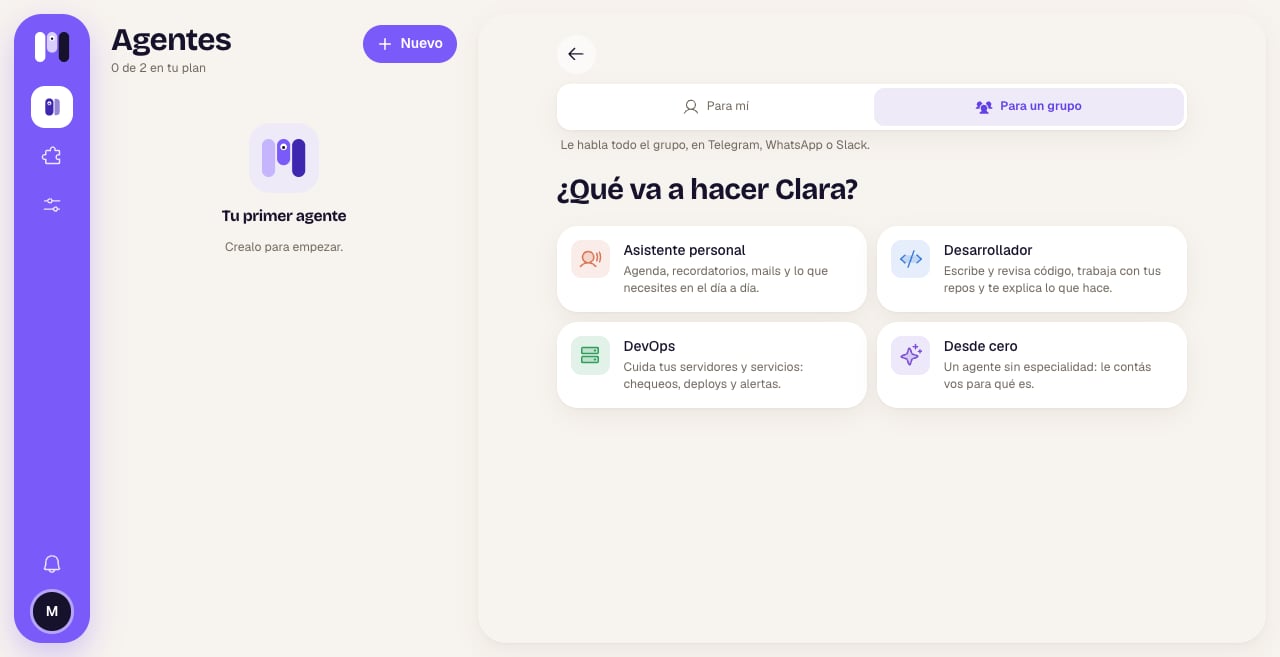
* **You choose it when you create it, and it can't be changed.** In the **Who it's for** step you tap **For a group** (“The whole group talks to it, on Telegram, WhatsApp or Slack.”). A personal agent can't become a group one, or the other way around.
* **It doesn't use the minai chat.** Only Telegram, WhatsApp or Slack.
* **It stays in its group.** It can't change channels: “A group agent stays in its group. For another group, make another agent.”
* **Some plugins aren't available.** The personal-only ones (like WhatsApp, Gmail or the banks) can't be added to it.
## How to set it up on each platform
Same as a [Telegram agent](/en/reference/channels/telegram): **Open Telegram** → **Start** → **Create Clara** → open the new bot and tap **Start**.
In the bot's chat, tap the button below, **Create Clara's group**. Telegram asks you for a name: put anything, it then gets renamed “Clara Group”, with the agent's picture.
The bot joins as an admin and tells you “Done ✅ I now talk in the group “…”. Add whoever you want.”. In minai you see “Clara is in its group”.
**How people join:** from Telegram, with the group's invite link.
If the bot isn't an admin, it'll ask you to make it one (“To read everything written here, make me an admin of the group.”). If someone messages the bot privately, it answers “Clara only answers in the group “…”.”.
You choose the line (the first time), introduce yourself to the line with the code from your WhatsApp, and minai creates the group. See [WhatsApp](/en/reference/channels/whatsapp).
The group has the line and you in it, with you as admin.
**How people join:** “You're the group's admin: add and remove people from WhatsApp.”
**Add to Slack** (the first time in that workspace) and minai creates the agent's channel. See [Slack](/en/reference/channels/slack).
The channel's purpose already says it: “Clara, this channel's minai agent: add whoever you want with /invite.”
**How people join:** from Slack, with `/invite` in the channel.
minai doesn't manage who's in the group: people come and go from the platform. In **Overview** → **Where it talks**, the agent shows “The whole group talks to it” and how to add people.
## How it behaves
* **It listens to everyone equally.** For it, “its person” is the whole group. For now it answers every message: you don't need to mention it.
* **It learns who's who.** Since minai doesn't give it the member list, it keeps a participants section in its memory as people write: each person's name, what they like to be called, what they do.
* **It says who it's answering.** It doesn't assume that whoever's writing now is the one who asked for something before.
* **What's said there belongs to the group.** Schedules requested in the group are announced in the group.
* **Accounts have an owner.** If it connects an account (GitHub, Google…), it says whose it is and doesn't use it for other people's things without the group knowing.
* **If two people ask for things that clash,** it says so and asks the group.
* **It speaks the group's language:** it answers in the language people write to it in.
## Examples
* Ana: "Remind us on Friday at 6 pm to buy the gift." → on Friday at 6 pm it posts a reminder in the group.
* Juan: "What did Ana ask for yesterday?" → it answers addressing Juan and tells him what Ana asked.
* Ana: "Connect the calendar." → "I connected Google Calendar with Ana's account."
* Ana: "Set the meeting for Tuesday." Juan: "No, Wednesday." → it points out they don't match and asks which day it is.
* "Make the grocery list for the weekend and split it among the four of us."
## Limits
* It doesn't use the minai chat and can't change channels.
* For another group, another agent.
* No personal-only plugins.
* If you rename it, the group or channel keeps its own name (on Telegram, the bot does change its name). The picture does update.
* The whole group shares what the agent remembers and does: don't keep things there you don't want everyone to see.
Step by step, with For me and For a group.
What changes from one channel to another.
This documentation is built and hosted on [Mintlify](https://mintlify.com), a developer documentation platform.
## What to know first
* **You choose it when you create it, and it can't be changed.** In the **Who it's for** step you tap **For a group** (“The whole group talks to it, on Telegram, WhatsApp or Slack.”). A personal agent can't become a group one, or the other way around.
* **It doesn't use the minai chat.** Only Telegram, WhatsApp or Slack.
* **It stays in its group.** It can't change channels: “A group agent stays in its group. For another group, make another agent.”
* **Some plugins aren't available.** The personal-only ones (like WhatsApp, Gmail or the banks) can't be added to it.
## How to set it up on each platform
Same as a [Telegram agent](/en/reference/channels/telegram): **Open Telegram** → **Start** → **Create Clara** → open the new bot and tap **Start**.
In the bot's chat, tap the button below, **Create Clara's group**. Telegram asks you for a name: put anything, it then gets renamed “Clara Group”, with the agent's picture.
The bot joins as an admin and tells you “Done ✅ I now talk in the group “…”. Add whoever you want.”. In minai you see “Clara is in its group”.
**How people join:** from Telegram, with the group's invite link.
If the bot isn't an admin, it'll ask you to make it one (“To read everything written here, make me an admin of the group.”). If someone messages the bot privately, it answers “Clara only answers in the group “…”.”.
You choose the line (the first time), introduce yourself to the line with the code from your WhatsApp, and minai creates the group. See [WhatsApp](/en/reference/channels/whatsapp).
The group has the line and you in it, with you as admin.
**How people join:** “You're the group's admin: add and remove people from WhatsApp.”
**Add to Slack** (the first time in that workspace) and minai creates the agent's channel. See [Slack](/en/reference/channels/slack).
The channel's purpose already says it: “Clara, this channel's minai agent: add whoever you want with /invite.”
**How people join:** from Slack, with `/invite` in the channel.
minai doesn't manage who's in the group: people come and go from the platform. In **Overview** → **Where it talks**, the agent shows “The whole group talks to it” and how to add people.
## How it behaves
* **It listens to everyone equally.** For it, “its person” is the whole group. For now it answers every message: you don't need to mention it.
* **It learns who's who.** Since minai doesn't give it the member list, it keeps a participants section in its memory as people write: each person's name, what they like to be called, what they do.
* **It says who it's answering.** It doesn't assume that whoever's writing now is the one who asked for something before.
* **What's said there belongs to the group.** Schedules requested in the group are announced in the group.
* **Accounts have an owner.** If it connects an account (GitHub, Google…), it says whose it is and doesn't use it for other people's things without the group knowing.
* **If two people ask for things that clash,** it says so and asks the group.
* **It speaks the group's language:** it answers in the language people write to it in.
## Examples
* Ana: "Remind us on Friday at 6 pm to buy the gift." → on Friday at 6 pm it posts a reminder in the group.
* Juan: "What did Ana ask for yesterday?" → it answers addressing Juan and tells him what Ana asked.
* Ana: "Connect the calendar." → "I connected Google Calendar with Ana's account."
* Ana: "Set the meeting for Tuesday." Juan: "No, Wednesday." → it points out they don't match and asks which day it is.
* "Make the grocery list for the weekend and split it among the four of us."
## Limits
* It doesn't use the minai chat and can't change channels.
* For another group, another agent.
* No personal-only plugins.
* If you rename it, the group or channel keeps its own name (on Telegram, the bot does change its name). The picture does update.
* The whole group shares what the agent remembers and does: don't keep things there you don't want everyone to see.
Step by step, with For me and For a group.
What changes from one channel to another.
This documentation is built and hosted on [Mintlify](https://mintlify.com), a developer documentation platform.