> ## Documentation Index
> Fetch the complete documentation index at: https://docs.min-ai.ar/llms.txt
> Use this file to discover all available pages before exploring further.
# Agent: Activity
> Every time an agent worked: what got it started, how long it took, whether it failed and what steps it took.
The log of what the agent did, time by time, to understand what happened or why something went wrong.
**How to get there:** the agent's page → **Activity** tab. It refreshes by itself every 15 seconds.
 ## No activity
“It hasn't worked yet” — “Here you'll see every time Clara does something.”
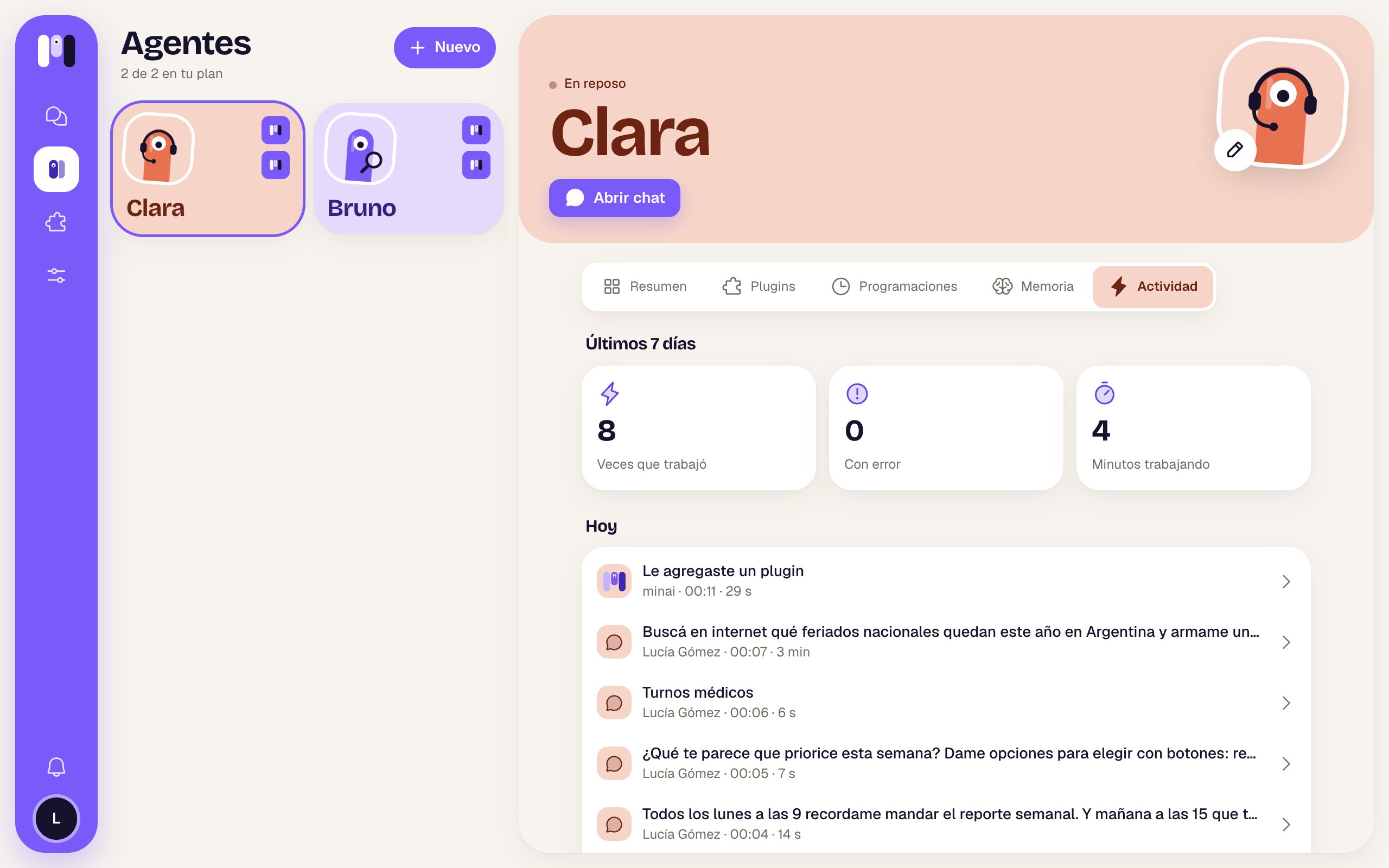
## Last 7 days
At the top, three boxes:
| Box | What it counts |
| - | - |
| **Times it worked** | How many times it started doing something. |
| **Has an error** | How many of those ended with an error. |
| Time working | The total, in seconds, minutes or hours. |
## The list, by day
Grouped by day (“Today”, “Yesterday”, “Mon, Sep 28”). Each row is one time it worked:
| Part | What it is |
| - | - |
| Icon | What got it started: a message, a schedule, a notice or another agent. |
| Text | The message or the task. |
| Below | Who · time · how long it took, or “working…” if it's still going. |
| Marks | **Has an error** (red), **Interrupted** (it was cut short), **Didn't answer**, or the animated minis while it's working. |
**See more** loads earlier days. A month is kept.
## One time, step by step
Tap a row and its details open.
## No activity
“It hasn't worked yet” — “Here you'll see every time Clara does something.”
## Last 7 days
At the top, three boxes:
| Box | What it counts |
| - | - |
| **Times it worked** | How many times it started doing something. |
| **Has an error** | How many of those ended with an error. |
| Time working | The total, in seconds, minutes or hours. |
## The list, by day
Grouped by day (“Today”, “Yesterday”, “Mon, Sep 28”). Each row is one time it worked:
| Part | What it is |
| - | - |
| Icon | What got it started: a message, a schedule, a notice or another agent. |
| Text | The message or the task. |
| Below | Who · time · how long it took, or “working…” if it's still going. |
| Marks | **Has an error** (red), **Interrupted** (it was cut short), **Didn't answer**, or the animated minis while it's working. |
**See more** loads earlier days. A month is kept.
## One time, step by step
Tap a row and its details open.
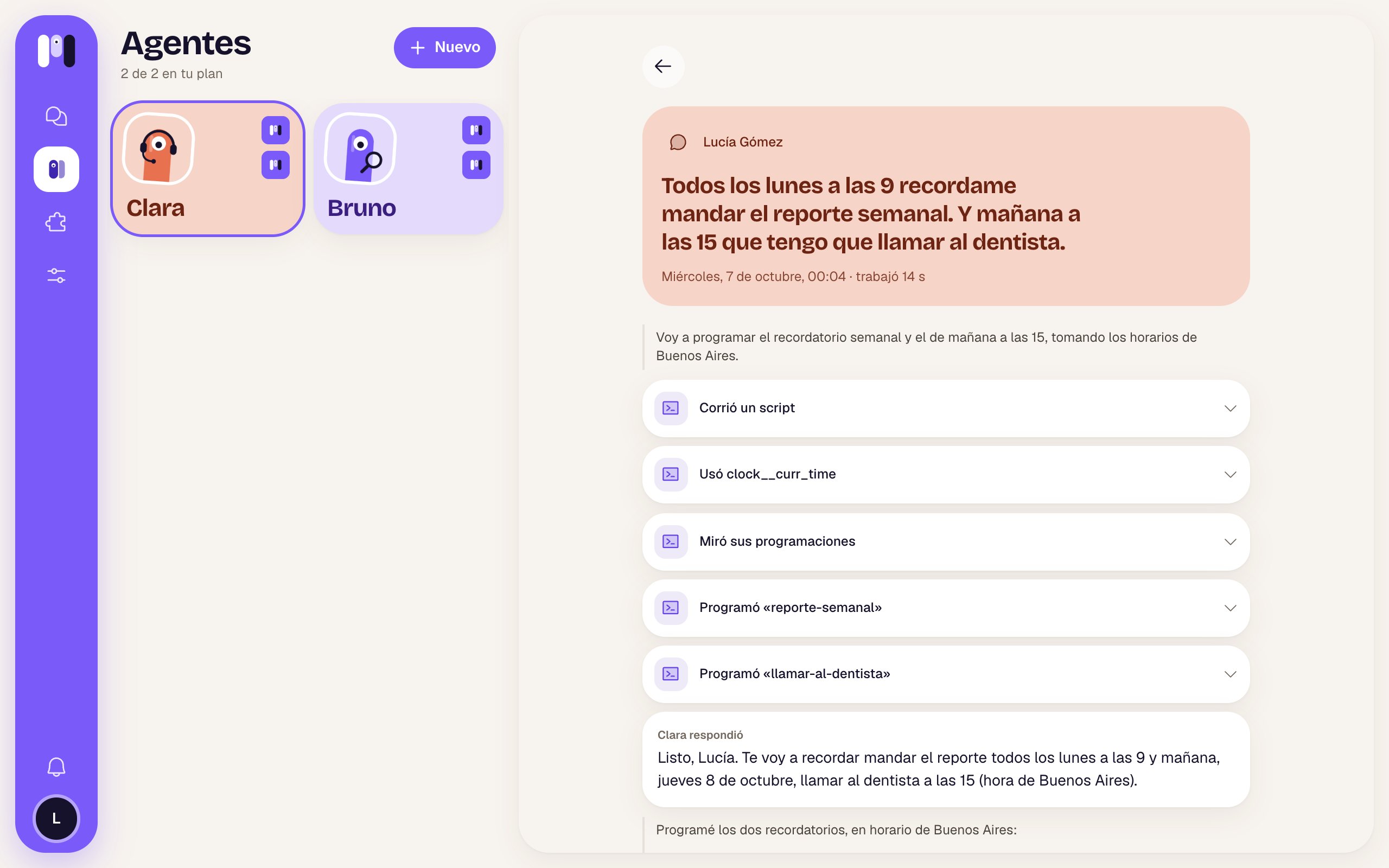 | Part | What it shows |
| - | - |
| Colored header | What started it (a message, a schedule, a notice, another agent, or who wrote), the text, and “date and time · worked 14 s” (or “working”). |
| If something went wrong | “It ended with an error” and the error (or “We don't know what happened.”); “It was cut short before it finished.”; “It ended without answering.”; or “Its steps weren't recorded.” |
| What it said while working | Quotes in gray. |
| Each thing it used | Rows like “Looked at its schedules” or “Scheduled “weekly-report””. Expand one to see **Gave it** (what it sent) and **Got back** (what it got in reply). If it failed, it says **Failed** in red. |
| **Clara answered** | The answer it gave you. |
While it's still working, at the bottom it says “Still working…”. If that time is more than a month old: “It's gone” — “A month of activity is kept.”
If you see **Has an error** a lot, or an agent that doesn't answer, check [Troubleshooting](/en/help/troubleshooting) or try **Restart** from the [Overview](/en/reference/screens/agent-overview).
What to do if it gets stuck.
What it does on its own, on time.
This documentation is built and hosted on [Mintlify](https://mintlify.com), a developer documentation platform.
| Part | What it shows |
| - | - |
| Colored header | What started it (a message, a schedule, a notice, another agent, or who wrote), the text, and “date and time · worked 14 s” (or “working”). |
| If something went wrong | “It ended with an error” and the error (or “We don't know what happened.”); “It was cut short before it finished.”; “It ended without answering.”; or “Its steps weren't recorded.” |
| What it said while working | Quotes in gray. |
| Each thing it used | Rows like “Looked at its schedules” or “Scheduled “weekly-report””. Expand one to see **Gave it** (what it sent) and **Got back** (what it got in reply). If it failed, it says **Failed** in red. |
| **Clara answered** | The answer it gave you. |
While it's still working, at the bottom it says “Still working…”. If that time is more than a month old: “It's gone” — “A month of activity is kept.”
If you see **Has an error** a lot, or an agent that doesn't answer, check [Troubleshooting](/en/help/troubleshooting) or try **Restart** from the [Overview](/en/reference/screens/agent-overview).
What to do if it gets stuck.
What it does on its own, on time.
This documentation is built and hosted on [Mintlify](https://mintlify.com), a developer documentation platform.