> ## Documentation Index
> Fetch the complete documentation index at: https://docs.min-ai.ar/llms.txt
> Use this file to discover all available pages before exploring further.
# Agent: Model
> Which AI an agent thinks with and at what level: what each option changes and what happens when you change it.
Where you choose, for each agent, which AI it thinks with and how hard it tries.
**How to get there:** the agent's [Overview](/en/reference/screens/agent-overview) → **Model** section.
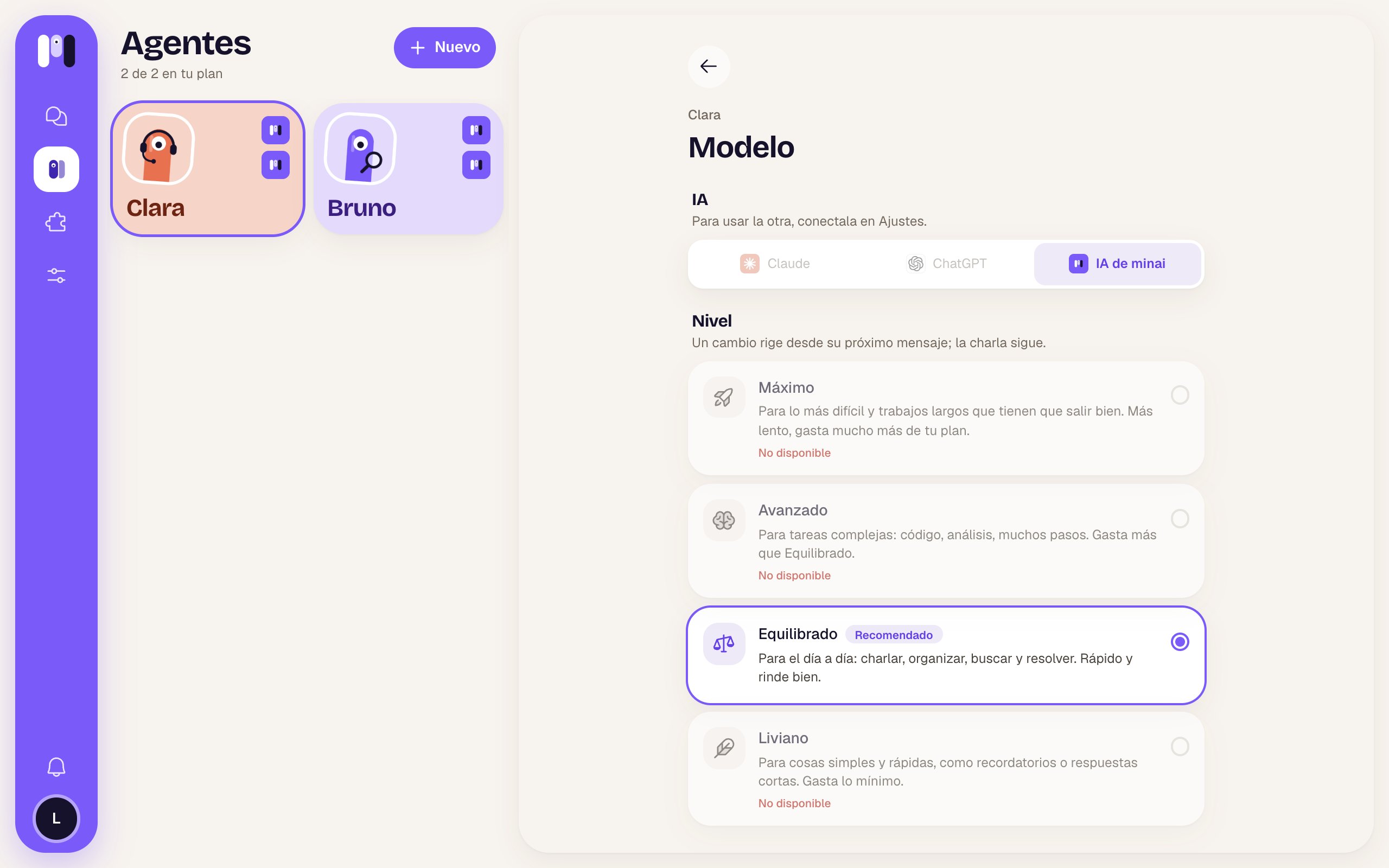 At the top: the arrow to go back, the agent's name in small type and the title **Model**.
## AI
A picker with your account's AIs: **Claude**, **ChatGPT** and, if you connected it, your own API or **minai's AI**. The ones you haven't connected are grayed out; if you have only one, it says “To use the other one, connect it in Settings.” (you connect them in [Settings → Models](/en/reference/screens/settings-models)).
When you pick another AI it asks you to confirm: **“Move Clara to Claude?”** — “A new conversation starts: of what you've talked about so far, it keeps only a summary of the latest. It keeps its memory, plugins, keys and schedules.” → **Switch to Claude** or **Cancel**.
When you switch:
* a **new conversation** starts, with a summary of the latest;
* it keeps its memory, plugins, keys and schedules;
* it keeps the same level (or the closest one the other AI has);
* it writes to you in its chat that it now thinks with the other AI, and asks you to remind it if it was in the middle of something.
Switching AI breaks the thread of the conversation. If it was halfway through a task, tell it again where you left off.
## Level
“A change applies from its next message; the conversation goes on.” Tap a card and it's selected right away, with no confirmation.
| Level | What it's for |
| - | - |
| **Maximum** | “For the hardest things and long jobs that have to go right. Slower, uses much more of your plan.” |
| **Advanced** | “For complex tasks: code, analysis, many steps. Uses more than Balanced.” |
| **Balanced** | “For every day: chatting, organizing, looking things up and getting them done. Fast and goes a long way.” |
| **Light** | “For simple, quick things, like reminders or short answers. Uses the least.” |
* **Recommended** marks the suggested one (Balanced, or the closest).
* **Not available** (gray, in red at the bottom): that AI doesn't offer that level.
* The selected one has a violet border and a filled circle.
If something fails: “We couldn't change it” — “Try again in a while.”
A higher level isn't always better: it uses more of your subscription or your plan. Start with Balanced and go up only if it struggles. See [Your AI and the models](/en/concepts/your-ai-and-models).
A subscription, your own API or minai's AI.
Everything you can change.
This documentation is built and hosted on [Mintlify](https://mintlify.com), a developer documentation platform.
At the top: the arrow to go back, the agent's name in small type and the title **Model**.
## AI
A picker with your account's AIs: **Claude**, **ChatGPT** and, if you connected it, your own API or **minai's AI**. The ones you haven't connected are grayed out; if you have only one, it says “To use the other one, connect it in Settings.” (you connect them in [Settings → Models](/en/reference/screens/settings-models)).
When you pick another AI it asks you to confirm: **“Move Clara to Claude?”** — “A new conversation starts: of what you've talked about so far, it keeps only a summary of the latest. It keeps its memory, plugins, keys and schedules.” → **Switch to Claude** or **Cancel**.
When you switch:
* a **new conversation** starts, with a summary of the latest;
* it keeps its memory, plugins, keys and schedules;
* it keeps the same level (or the closest one the other AI has);
* it writes to you in its chat that it now thinks with the other AI, and asks you to remind it if it was in the middle of something.
Switching AI breaks the thread of the conversation. If it was halfway through a task, tell it again where you left off.
## Level
“A change applies from its next message; the conversation goes on.” Tap a card and it's selected right away, with no confirmation.
| Level | What it's for |
| - | - |
| **Maximum** | “For the hardest things and long jobs that have to go right. Slower, uses much more of your plan.” |
| **Advanced** | “For complex tasks: code, analysis, many steps. Uses more than Balanced.” |
| **Balanced** | “For every day: chatting, organizing, looking things up and getting them done. Fast and goes a long way.” |
| **Light** | “For simple, quick things, like reminders or short answers. Uses the least.” |
* **Recommended** marks the suggested one (Balanced, or the closest).
* **Not available** (gray, in red at the bottom): that AI doesn't offer that level.
* The selected one has a violet border and a filled circle.
If something fails: “We couldn't change it” — “Try again in a while.”
A higher level isn't always better: it uses more of your subscription or your plan. Start with Balanced and go up only if it struggles. See [Your AI and the models](/en/concepts/your-ai-and-models).
A subscription, your own API or minai's AI.
Everything you can change.
This documentation is built and hosted on [Mintlify](https://mintlify.com), a developer documentation platform.