> ## Documentation Index
> Fetch the complete documentation index at: https://docs.min-ai.ar/llms.txt
> Use this file to discover all available pages before exploring further.
# Agent: Name and face
> Changing an agent's name, face and color, and what changes on Telegram, WhatsApp and Slack.
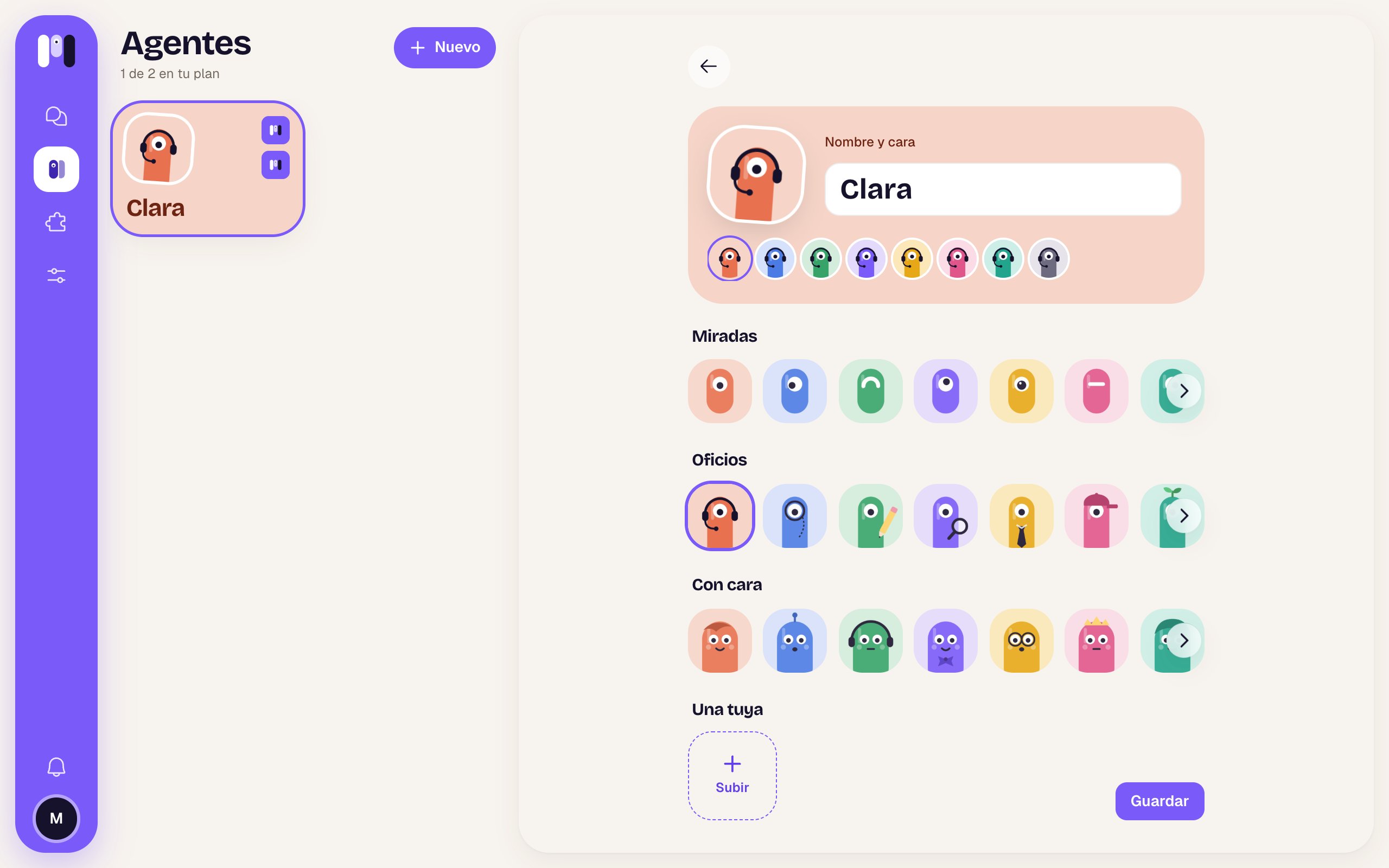
Where you change an agent's name, face and color.
**How to get there:** the agent's page → the pencil on its face (**Change name and face**).
 ## What's there
| Item | What it is |
| - | - |
| Top card | The face as it will look, in the chosen color, and the field with the name (up to 60 characters). |
| Colors | Eight circles with the mini in each color: Coral, Blue, Green, Violet, Amber, Pink, Turquoise and Gray. Only if you picked a mini (not with an image of your own). |
| **Looks**, **Trades**, **With a face** | Three rows of minis (minai's characters). Swipe or use the arrow to see more. |
| **One of yours** | Images you've uploaded and **Upload** (+). PNG or JPG up to 2 MB; if not: “Use a PNG or JPG image of up to 2 MB.” |
| **Save** | Saves the changes. |
## If you change its name and it talks outside
If the agent talks on Telegram, WhatsApp or Slack, when you save a new name it asks you **“It's called Ana now?”** and shows you what follows the change (✓) and what doesn't (ⓘ):
| Channel | Personal agent | Group agent |
| - | - | - |
| Telegram | Its bot gets the agent's name (the @ stays the same). | The bot changes; the **group** doesn't: change it yourself in Telegram. |
| WhatsApp | Its group gets the new name. | The group keeps its name: change it yourself in WhatsApp. |
| Slack | Its channel gets named after the agent. | The channel keeps its name: change it yourself in Slack. |
**Change it** confirms; **Cancel** goes back. The face updates too: the bot's picture and the group's. If it fails: “We couldn't change it. Try again.”
In minai chat the change shows right away, without asking.
Step by step.
Its channel and how to change it.
This documentation is built and hosted on [Mintlify](https://mintlify.com), a developer documentation platform.
## What's there
| Item | What it is |
| - | - |
| Top card | The face as it will look, in the chosen color, and the field with the name (up to 60 characters). |
| Colors | Eight circles with the mini in each color: Coral, Blue, Green, Violet, Amber, Pink, Turquoise and Gray. Only if you picked a mini (not with an image of your own). |
| **Looks**, **Trades**, **With a face** | Three rows of minis (minai's characters). Swipe or use the arrow to see more. |
| **One of yours** | Images you've uploaded and **Upload** (+). PNG or JPG up to 2 MB; if not: “Use a PNG or JPG image of up to 2 MB.” |
| **Save** | Saves the changes. |
## If you change its name and it talks outside
If the agent talks on Telegram, WhatsApp or Slack, when you save a new name it asks you **“It's called Ana now?”** and shows you what follows the change (✓) and what doesn't (ⓘ):
| Channel | Personal agent | Group agent |
| - | - | - |
| Telegram | Its bot gets the agent's name (the @ stays the same). | The bot changes; the **group** doesn't: change it yourself in Telegram. |
| WhatsApp | Its group gets the new name. | The group keeps its name: change it yourself in WhatsApp. |
| Slack | Its channel gets named after the agent. | The channel keeps its name: change it yourself in Slack. |
**Change it** confirms; **Cancel** goes back. The face updates too: the bot's picture and the group's. If it fails: “We couldn't change it. Try again.”
In minai chat the change shows right away, without asking.
Step by step.
Its channel and how to change it.
This documentation is built and hosted on [Mintlify](https://mintlify.com), a developer documentation platform.