> ## Documentation Index
> Fetch the complete documentation index at: https://docs.min-ai.ar/llms.txt
> Use this file to discover all available pages before exploring further.
# Agent: Overview
> An agent's page: its header, the tabs and the overview with channel, model, usage and the actions.
Each agent's first tab: how it's doing, where it talks, what it thinks with and how much it uses.
**How to get there:** **Agents** → tap the agent's card. Also with **See agent** from its chat.
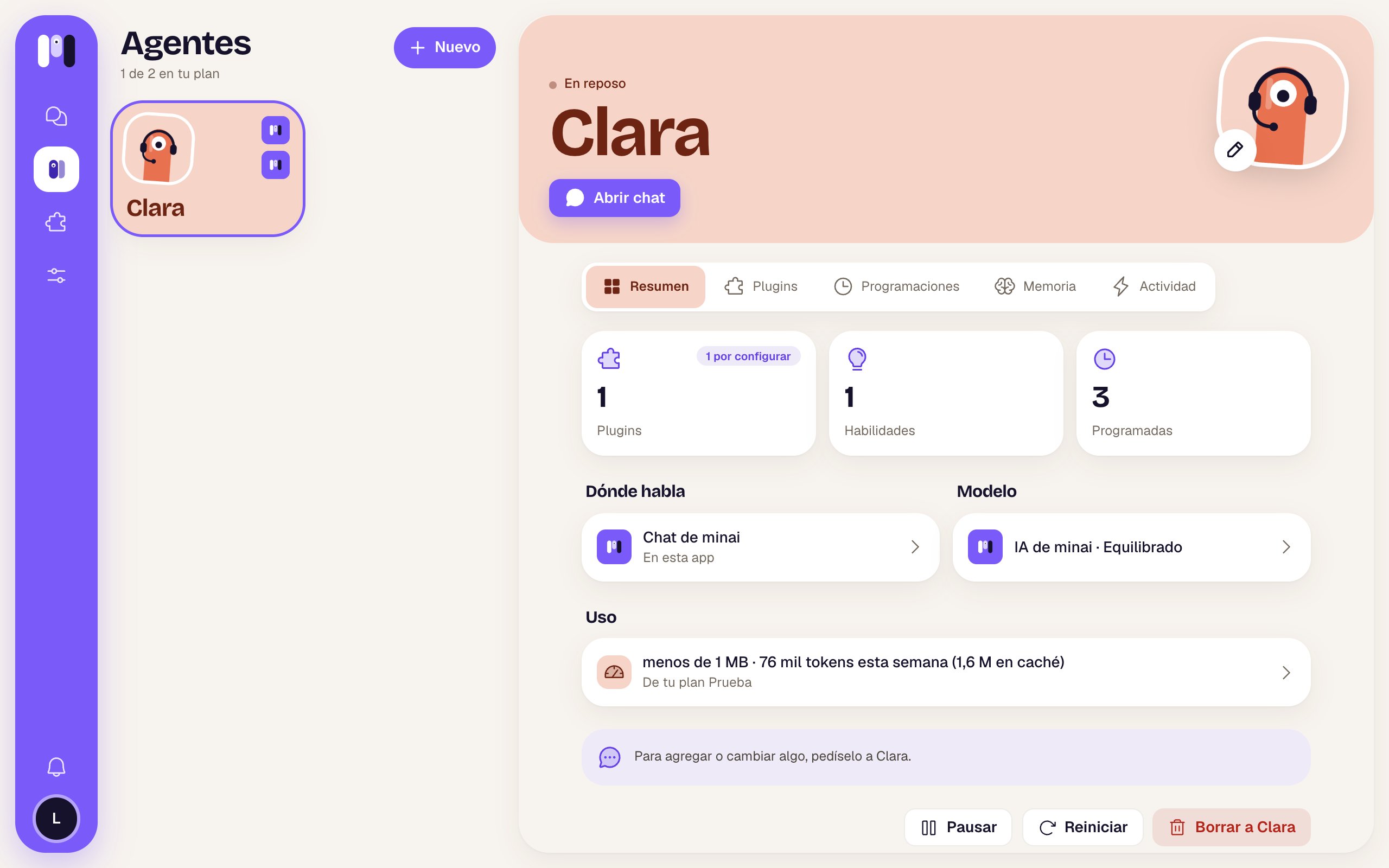 ## The header
It's on every one of the agent's tabs, in its color.
| Item | What it is |
| - | - |
| Arrow | Phone only: goes back to Agents. |
| Status | “Working now” (a pulsing green dot) while it's doing something, “Idle” if not, or “Paused” (⏸) if you paused it. |
| Name | Big. |
| Face with a pencil | **Change name and face**: opens [Name and face](/en/reference/screens/agent-name-and-face). |
| Main button | **Open chat** if it talks in minai chat; **Open in Telegram** / **WhatsApp** / **Slack** if it talks outside (opens that app); **Connect a channel** if it doesn't have one yet. |
Below are the tabs: **Overview**, [Plugins](/en/reference/screens/agent-plugins), [Schedules](/en/reference/screens/agent-schedules), [Memory](/en/reference/screens/agent-memory) and [Activity](/en/reference/screens/agent-activity). On a phone, only the selected one shows its name. The page refreshes by itself every 15 seconds.
## The three numbers
| Box | What it counts | When you tap it |
| - | - | - |
| **Plugins** | The plugins it has. With “1 to set up” if one is missing something. | Opens Plugins, with the one that needs setting up already expanded. |
| **Skills** | The skills it knows how to use (from plugins or made by itself). | Opens Plugins. |
| **Scheduled** | Its schedules. | Opens Schedules. |
## Where it talks
Only if it already has a channel. It shows the channel (“minai chat”, “Telegram”, “WhatsApp”, “Slack”) and where: “In this app”, the bot's @, the group or the Slack channel. If something's wrong, it says “It isn't working” in red. Tap it to go to [Where it talks](/en/reference/screens/agent-channel).
## Model
The AI and the level, for example “minai's AI · Balanced”. Tap it to go to [Model](/en/reference/screens/agent-model).
## Usage
The space it takes up and this week's tokens (for example “less than 1 MB · 76k tokens this week”), or “No tokens this week”. Below, which plan it comes out of. Tap it to go to [Plan and usage](/en/reference/screens/settings-plan-and-usage).
## The hint
“To add or change anything, ask Clara.” In minai almost everything gets set up by chatting with the agent: plugins, schedules, what it should remember.
## The actions
At the very bottom:
| Button | What it does |
| - | - |
| **Pause** | Asks you to confirm. It stops answering and running its schedules; nothing is deleted and it still counts toward your plan. While paused, the button becomes **Resume** (no confirmation). |
| **Restart** | Only if it isn't paused. Asks you to confirm. Cuts short whatever it's doing and starts again; the conversation goes on. When it's done: “Clara started again” — “You can write to it now.” |
| **Delete Clara** (red) | Asks you to confirm. Deletes its plugins, schedules and memory, and it stops answering on its channel. **This can't be undone.** Frees up its spot in your plan. |
If one of these doesn't go through, you see “That didn't work. Try again.”.
Deleting an agent can't be undone. Also, its Telegram bot is retired, the agent leaves its WhatsApp group and its Slack channel is archived. All the details are in [Stop, restart and pause](/en/reference/agent/stop-restart-and-pause).
When to use each one and what happens.
Name, face, AI, level and channel.
This documentation is built and hosted on [Mintlify](https://mintlify.com), a developer documentation platform.
## The header
It's on every one of the agent's tabs, in its color.
| Item | What it is |
| - | - |
| Arrow | Phone only: goes back to Agents. |
| Status | “Working now” (a pulsing green dot) while it's doing something, “Idle” if not, or “Paused” (⏸) if you paused it. |
| Name | Big. |
| Face with a pencil | **Change name and face**: opens [Name and face](/en/reference/screens/agent-name-and-face). |
| Main button | **Open chat** if it talks in minai chat; **Open in Telegram** / **WhatsApp** / **Slack** if it talks outside (opens that app); **Connect a channel** if it doesn't have one yet. |
Below are the tabs: **Overview**, [Plugins](/en/reference/screens/agent-plugins), [Schedules](/en/reference/screens/agent-schedules), [Memory](/en/reference/screens/agent-memory) and [Activity](/en/reference/screens/agent-activity). On a phone, only the selected one shows its name. The page refreshes by itself every 15 seconds.
## The three numbers
| Box | What it counts | When you tap it |
| - | - | - |
| **Plugins** | The plugins it has. With “1 to set up” if one is missing something. | Opens Plugins, with the one that needs setting up already expanded. |
| **Skills** | The skills it knows how to use (from plugins or made by itself). | Opens Plugins. |
| **Scheduled** | Its schedules. | Opens Schedules. |
## Where it talks
Only if it already has a channel. It shows the channel (“minai chat”, “Telegram”, “WhatsApp”, “Slack”) and where: “In this app”, the bot's @, the group or the Slack channel. If something's wrong, it says “It isn't working” in red. Tap it to go to [Where it talks](/en/reference/screens/agent-channel).
## Model
The AI and the level, for example “minai's AI · Balanced”. Tap it to go to [Model](/en/reference/screens/agent-model).
## Usage
The space it takes up and this week's tokens (for example “less than 1 MB · 76k tokens this week”), or “No tokens this week”. Below, which plan it comes out of. Tap it to go to [Plan and usage](/en/reference/screens/settings-plan-and-usage).
## The hint
“To add or change anything, ask Clara.” In minai almost everything gets set up by chatting with the agent: plugins, schedules, what it should remember.
## The actions
At the very bottom:
| Button | What it does |
| - | - |
| **Pause** | Asks you to confirm. It stops answering and running its schedules; nothing is deleted and it still counts toward your plan. While paused, the button becomes **Resume** (no confirmation). |
| **Restart** | Only if it isn't paused. Asks you to confirm. Cuts short whatever it's doing and starts again; the conversation goes on. When it's done: “Clara started again” — “You can write to it now.” |
| **Delete Clara** (red) | Asks you to confirm. Deletes its plugins, schedules and memory, and it stops answering on its channel. **This can't be undone.** Frees up its spot in your plan. |
If one of these doesn't go through, you see “That didn't work. Try again.”.
Deleting an agent can't be undone. Also, its Telegram bot is retired, the agent leaves its WhatsApp group and its Slack channel is archived. All the details are in [Stop, restart and pause](/en/reference/agent/stop-restart-and-pause).
When to use each one and what happens.
Name, face, AI, level and channel.
This documentation is built and hosted on [Mintlify](https://mintlify.com), a developer documentation platform.