> ## Documentation Index
> Fetch the complete documentation index at: https://docs.min-ai.ar/llms.txt
> Use this file to discover all available pages before exploring further.
# Agent: Plugins
> An agent's plugins, everything each card shows, what it made outside plugins, and how to remove a plugin or delete a key.
Which plugins an agent has, what each one is missing and what you can change yourself.
**How to get there:** the agent's page → **Plugins** tab. Also by tapping the **Plugins** or **Skills** box in the [Overview](/en/reference/screens/agent-overview).
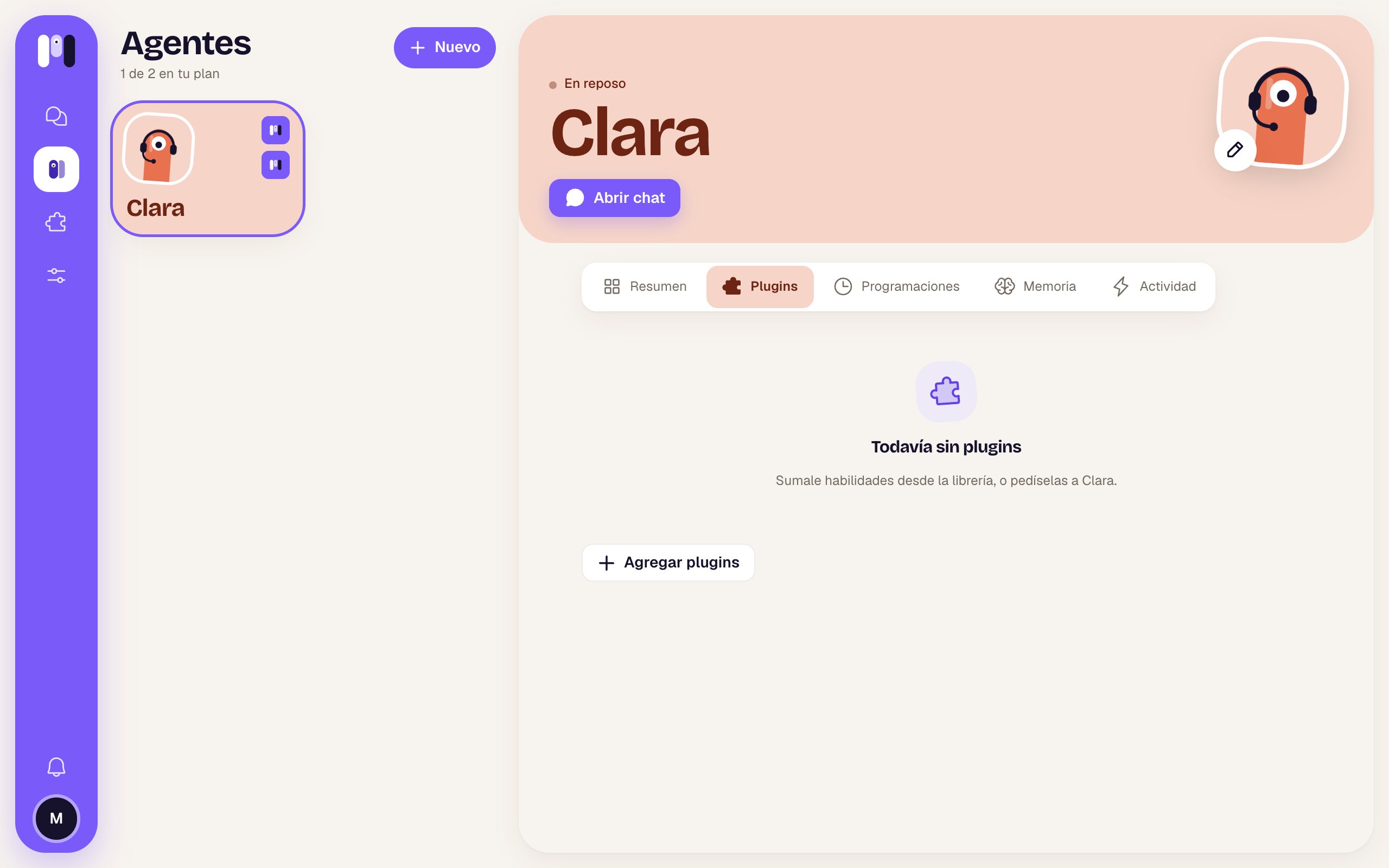
## No plugins
“No plugins yet” — “Give it skills from the library, or ask Clara for them.” and the **Add plugins** button.
 ## A plugin's card
Each plugin is a card that expands when you tap it.
## A plugin's card
Each plugin is a card that expands when you tap it.
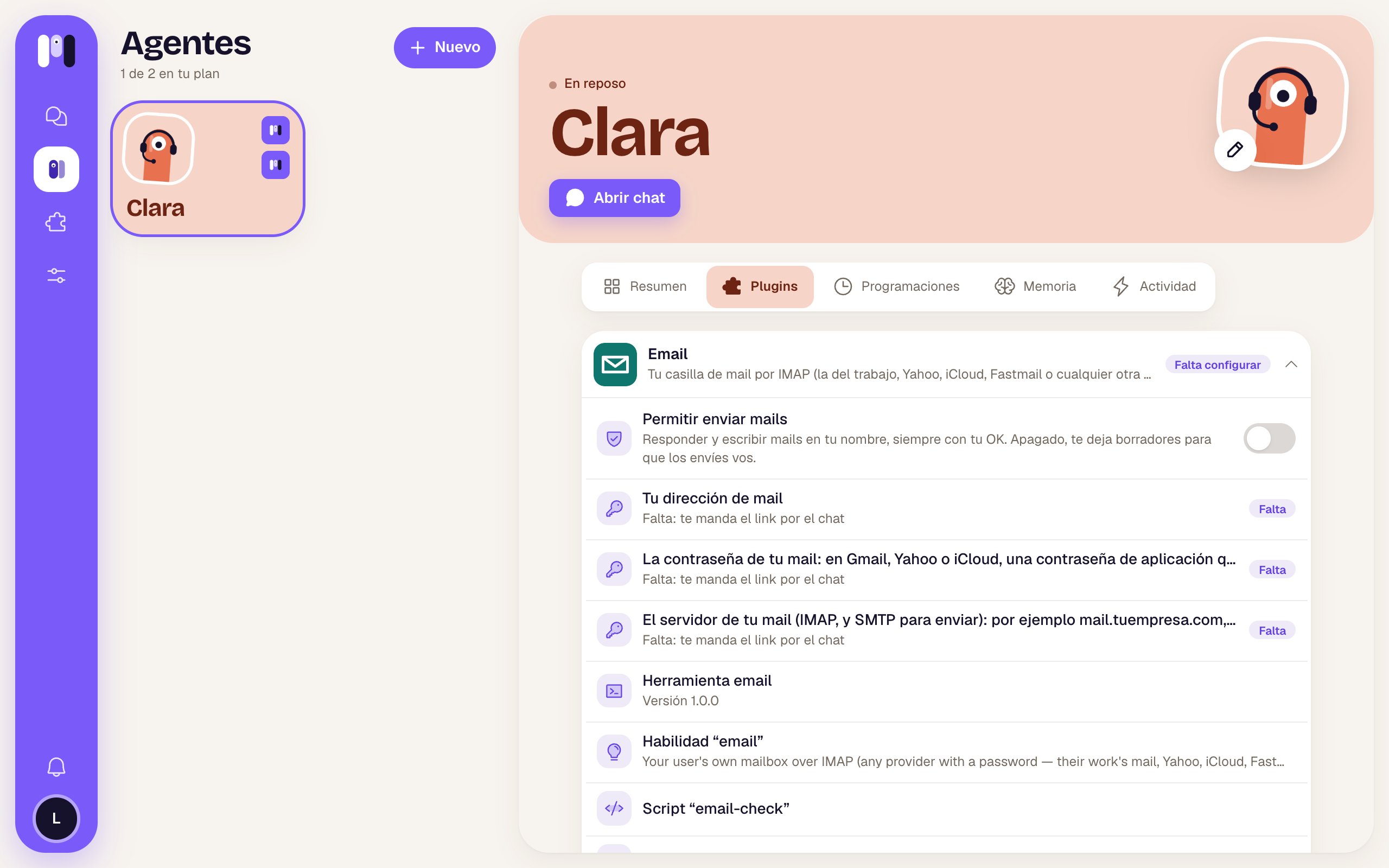 ### Collapsed
| Part | What it is |
| - | - |
| Icon, name and description | Which plugin it is and what it's for (or its version). |
| **Needs setting up** | It's missing something to work: a key, a value or finishing the installer. |
| **Has an error** (red) | Something failed while getting it ready. |
### Expanded
From top to bottom, depending on what each plugin has:
| Row | What it shows | What you can do |
| - | - | - |
| Google account | “It can read and act, with your OK” or “It can only read”, and the connected email. | **Change** opens the installer at the connect step: another account or another permission. |
| Atlassian account | The same; or “The connection was cut” with the reason. | **Change**, or **Reconnect** if it was cut. |
| Plugin settings (shield) | Things **only you** can change, like **Allow sending email**. A switch or a list to pick from. | Change it. The agent finds out. If it fails: “It couldn't be changed. Try again.” |
| Values | What it is and its value; or “Missing: it'll ask you in the chat” with **Missing**. | Nothing: the agent asks you for it. |
| Keys (key icon) | “Entered · kept encrypted”; or “Missing: it'll send you the link in the chat” with **Missing**. Some say “Set by the installer” or “Set by minai”. | Delete an entered one with the trash can (**Delete the key**). |
| What it includes | Tool … (with its version), Skill “…”, Connection “…”, Script “…”, Schedule “…”, Webhook “…”. | Just for your information. |
And the buttons at the end:
* **Finish installing** — only if the plugin has an installer on the web (Google, Atlassian) and needs setting up.
* **See in the library** — opens the plugin's page in the [library](/en/reference/screens/plugin-library).
* **Remove** (red) — takes it away from the agent (see below).
Keys are never typed in the chat. When one is missing, the agent sends you a one-time link. See [Keys and values](/en/tools/keys-and-values).
## Add plugins
The **Add plugins** (+) button opens the library to pick one for this agent. If the agent is paused, it tells you to resume it first instead, so it sets things up with you. See [Add a plugin](/en/tools/add-a-plugin).
## Outside the plugins
At the bottom there's a section with what the agent has **that didn't come from a plugin**: things it built itself or keys you entered separately.
| Group | What it lists |
| - | - |
| **Skills** | Each skill and who made it: the agent, “you” or a plugin. |
| **Keys** | Its name and what it's for (or where it came from and when). With a trash can to delete it. |
| **Variables** | Values that come from a key (“From the key …”). |
| **Others** | Connections, scripts and webhooks it built. |
## Remove a plugin
**Remove** asks you to confirm: “Remove Email from Clara?” — “It won't have it anymore, and we'll let it know. The keys you entered for it go with it: if you add it again, they're asked for again.” → **Remove** or **Cancel**.
The plugin's schedules go with it. If it fails: “We couldn't remove it. Try again.”. See [Remove a plugin](/en/tools/remove-a-plugin).
## Delete a key
A key's trash can asks you to confirm: “Delete this key?”, with its description, and:
* if it's a plugin's: the plugin waits for you to enter it again; if it needs it again, it'll ask you in the chat;
* if it's a standalone one: the agent can't use it anymore; if it needs it again, it'll ask you in the chat.
**Delete the key** confirms. Keys set by minai can't be deleted.
What each plugin can do and with what OK.
Find and add plugins.
This documentation is built and hosted on [Mintlify](https://mintlify.com), a developer documentation platform.
### Collapsed
| Part | What it is |
| - | - |
| Icon, name and description | Which plugin it is and what it's for (or its version). |
| **Needs setting up** | It's missing something to work: a key, a value or finishing the installer. |
| **Has an error** (red) | Something failed while getting it ready. |
### Expanded
From top to bottom, depending on what each plugin has:
| Row | What it shows | What you can do |
| - | - | - |
| Google account | “It can read and act, with your OK” or “It can only read”, and the connected email. | **Change** opens the installer at the connect step: another account or another permission. |
| Atlassian account | The same; or “The connection was cut” with the reason. | **Change**, or **Reconnect** if it was cut. |
| Plugin settings (shield) | Things **only you** can change, like **Allow sending email**. A switch or a list to pick from. | Change it. The agent finds out. If it fails: “It couldn't be changed. Try again.” |
| Values | What it is and its value; or “Missing: it'll ask you in the chat” with **Missing**. | Nothing: the agent asks you for it. |
| Keys (key icon) | “Entered · kept encrypted”; or “Missing: it'll send you the link in the chat” with **Missing**. Some say “Set by the installer” or “Set by minai”. | Delete an entered one with the trash can (**Delete the key**). |
| What it includes | Tool … (with its version), Skill “…”, Connection “…”, Script “…”, Schedule “…”, Webhook “…”. | Just for your information. |
And the buttons at the end:
* **Finish installing** — only if the plugin has an installer on the web (Google, Atlassian) and needs setting up.
* **See in the library** — opens the plugin's page in the [library](/en/reference/screens/plugin-library).
* **Remove** (red) — takes it away from the agent (see below).
Keys are never typed in the chat. When one is missing, the agent sends you a one-time link. See [Keys and values](/en/tools/keys-and-values).
## Add plugins
The **Add plugins** (+) button opens the library to pick one for this agent. If the agent is paused, it tells you to resume it first instead, so it sets things up with you. See [Add a plugin](/en/tools/add-a-plugin).
## Outside the plugins
At the bottom there's a section with what the agent has **that didn't come from a plugin**: things it built itself or keys you entered separately.
| Group | What it lists |
| - | - |
| **Skills** | Each skill and who made it: the agent, “you” or a plugin. |
| **Keys** | Its name and what it's for (or where it came from and when). With a trash can to delete it. |
| **Variables** | Values that come from a key (“From the key …”). |
| **Others** | Connections, scripts and webhooks it built. |
## Remove a plugin
**Remove** asks you to confirm: “Remove Email from Clara?” — “It won't have it anymore, and we'll let it know. The keys you entered for it go with it: if you add it again, they're asked for again.” → **Remove** or **Cancel**.
The plugin's schedules go with it. If it fails: “We couldn't remove it. Try again.”. See [Remove a plugin](/en/tools/remove-a-plugin).
## Delete a key
A key's trash can asks you to confirm: “Delete this key?”, with its description, and:
* if it's a plugin's: the plugin waits for you to enter it again; if it needs it again, it'll ask you in the chat;
* if it's a standalone one: the agent can't use it anymore; if it needs it again, it'll ask you in the chat.
**Delete the key** confirms. Keys set by minai can't be deleted.
What each plugin can do and with what OK.
Find and add plugins.
This documentation is built and hosted on [Mintlify](https://mintlify.com), a developer documentation platform.