> ## Documentation Index
> Fetch the complete documentation index at: https://docs.min-ai.ar/llms.txt
> Use this file to discover all available pages before exploring further.
# Agent: Schedules
> What an agent does on its own, on time: each schedule, how to pause it and how to delete it.
The list of what the agent has scheduled: reminders, checks and tasks it repeats or does once.
**How to get there:** the agent's page → **Schedules** tab, or the **Scheduled** box in the [Overview](/en/reference/screens/agent-overview).
Schedules aren't created here: you ask the agent for them in the chat, for example "every Monday at 9 remind me…". Here you look at them, pause them or delete them.
## No schedules
“Nothing scheduled” — “Tell Clara «every Monday at 9…»”.
## The list
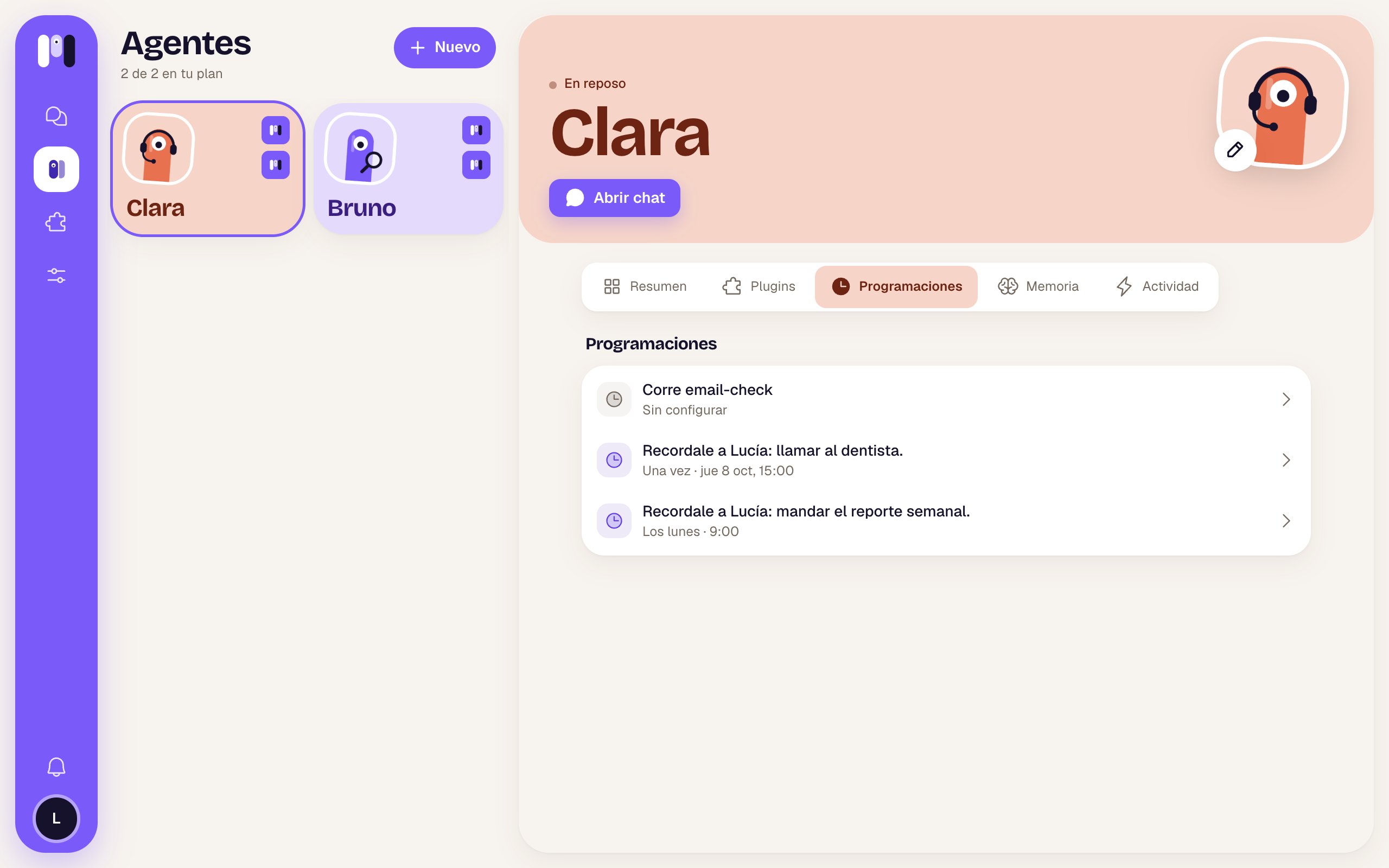 Each row has:
| Part | What it is |
| - | - |
| Clock | Gray if it isn't active. |
| What it does | For example “Remind Lucía: send the weekly report.” |
| When | In words: “Mondays · 9:00”, “Once · Thu Oct 8, 15:00”… or “Not set up”. |
| **Paused** | If you turned it off. |
Times are in your account's [time zone](/en/reference/screens/settings-time-zone).
## When you tap one
A sheet opens with the name and the when, and:
| Item | What it does |
| - | - |
| **Active** (switch) | On: “It runs on time”. Off: “Paused until you turn it on”. It isn't deleted. |
| “The plugin runs it” | Some plugin schedules are fixed: they can't be turned off from here. |
| “Not set up” | A plugin schedule that doesn't have a time yet. It says “Agree with Clara how often: it sets it up and turns it on from the chat.” |
| **Delete schedule** | Only on the ones that aren't from a plugin. Asks you to confirm: “Delete this schedule?” — “Clara stops doing it. This can't be undone.” → **Delete**. |
Plugin ones say “It belongs to the … plugin: it goes when you remove it.” If something fails: “It couldn't be changed. Try again.”.
Each schedule counts toward your plan's **runs a day**. See how many you use in [Plan and usage](/en/reference/screens/settings-plan-and-usage).
What an agent can schedule and how to ask for it.
The idea behind it.
This documentation is built and hosted on [Mintlify](https://mintlify.com), a developer documentation platform.
Each row has:
| Part | What it is |
| - | - |
| Clock | Gray if it isn't active. |
| What it does | For example “Remind Lucía: send the weekly report.” |
| When | In words: “Mondays · 9:00”, “Once · Thu Oct 8, 15:00”… or “Not set up”. |
| **Paused** | If you turned it off. |
Times are in your account's [time zone](/en/reference/screens/settings-time-zone).
## When you tap one
A sheet opens with the name and the when, and:
| Item | What it does |
| - | - |
| **Active** (switch) | On: “It runs on time”. Off: “Paused until you turn it on”. It isn't deleted. |
| “The plugin runs it” | Some plugin schedules are fixed: they can't be turned off from here. |
| “Not set up” | A plugin schedule that doesn't have a time yet. It says “Agree with Clara how often: it sets it up and turns it on from the chat.” |
| **Delete schedule** | Only on the ones that aren't from a plugin. Asks you to confirm: “Delete this schedule?” — “Clara stops doing it. This can't be undone.” → **Delete**. |
Plugin ones say “It belongs to the … plugin: it goes when you remove it.” If something fails: “It couldn't be changed. Try again.”.
Each schedule counts toward your plan's **runs a day**. See how many you use in [Plan and usage](/en/reference/screens/settings-plan-and-usage).
What an agent can schedule and how to ask for it.
The idea behind it.
This documentation is built and hosted on [Mintlify](https://mintlify.com), a developer documentation platform.