> ## Documentation Index
> Fetch the complete documentation index at: https://docs.min-ai.ar/llms.txt
> Use this file to discover all available pages before exploring further.
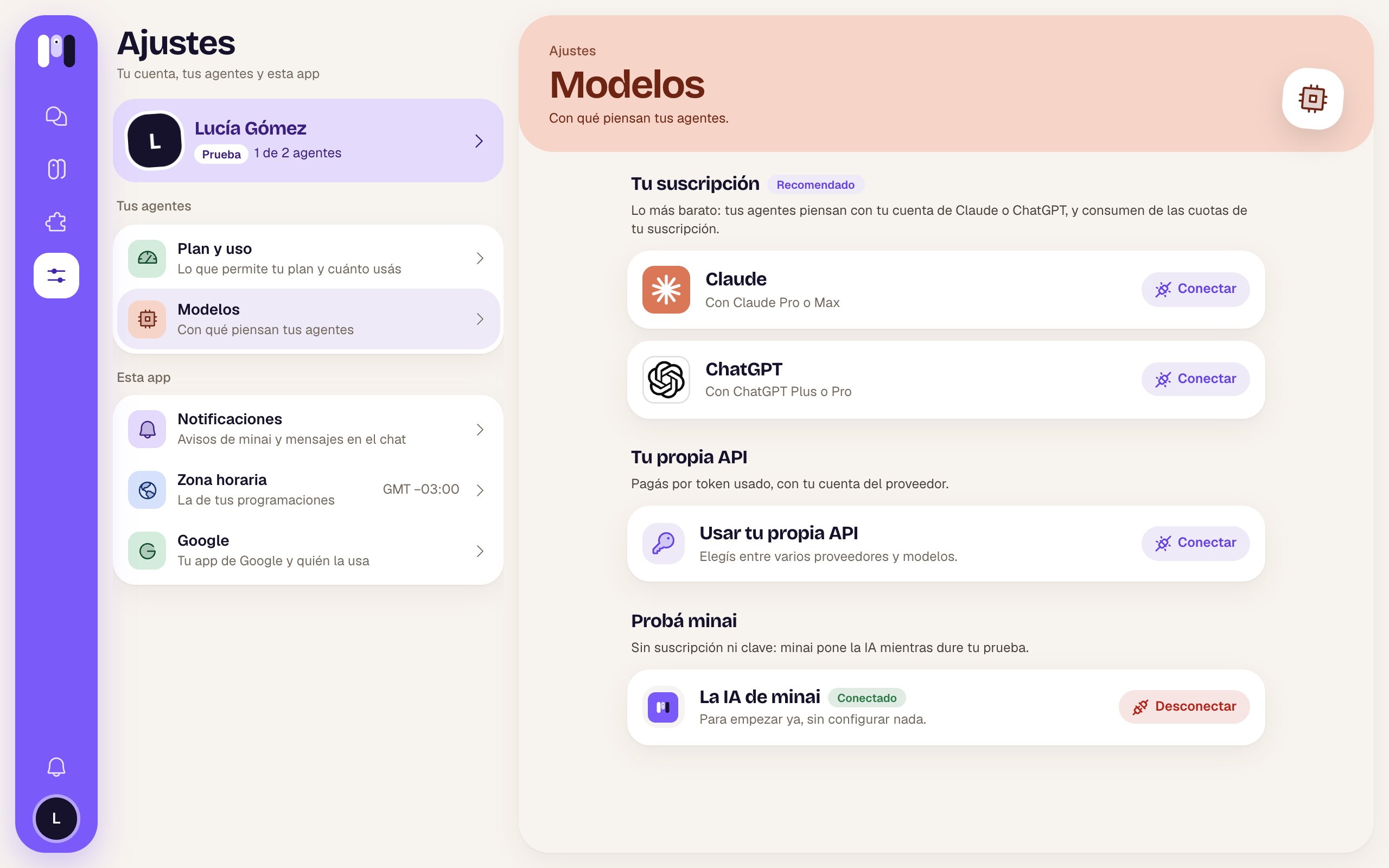
# Settings: Models
> Which AI your agents can think with: your Claude or ChatGPT subscription, your own API or minai's AI.
Where you connect your account's AIs. Then each agent picks which one it uses on its [Model](/en/reference/screens/agent-model) screen.
**How to get there:** **Settings** → **Models**. It's the same screen as **Connect your AI**, the first step when you start.
 ## Your subscription
With the **Recommended** tag: “The cheapest: your agents think with your Claude or ChatGPT account, and use your subscription's quota.”
| Card | Who it's for |
| - | - |
| **Claude** | “With Claude Pro or Max” |
| **ChatGPT** | “With ChatGPT Plus or Pro” |
* **Connect** walks you through it: for Claude, you open Claude, authorize and paste the code it gives you; for ChatGPT, you copy a code and paste it into ChatGPT, and it connects by itself. When it's done: “Claude connected”.
* Once connected, the card says **Connected** and the button becomes **Disconnect** (red). It asks you to confirm: “Your agents that think with Claude stop answering until you connect a source again.”
See [Connect your AI](/en/setup/connect-your-ai).
## Your own API
“You pay per token used, with your provider account.” The **Use your own API** card says “Choose among several providers and models.” or what you have connected. **Connect** (or **Change**) opens this screen:
## Your subscription
With the **Recommended** tag: “The cheapest: your agents think with your Claude or ChatGPT account, and use your subscription's quota.”
| Card | Who it's for |
| - | - |
| **Claude** | “With Claude Pro or Max” |
| **ChatGPT** | “With ChatGPT Plus or Pro” |
* **Connect** walks you through it: for Claude, you open Claude, authorize and paste the code it gives you; for ChatGPT, you copy a code and paste it into ChatGPT, and it connects by itself. When it's done: “Claude connected”.
* Once connected, the card says **Connected** and the button becomes **Disconnect** (red). It asks you to confirm: “Your agents that think with Claude stop answering until you connect a source again.”
See [Connect your AI](/en/setup/connect-your-ai).
## Your own API
“You pay per token used, with your provider account.” The **Use your own API** card says “Choose among several providers and models.” or what you have connected. **Connect** (or **Change**) opens this screen:
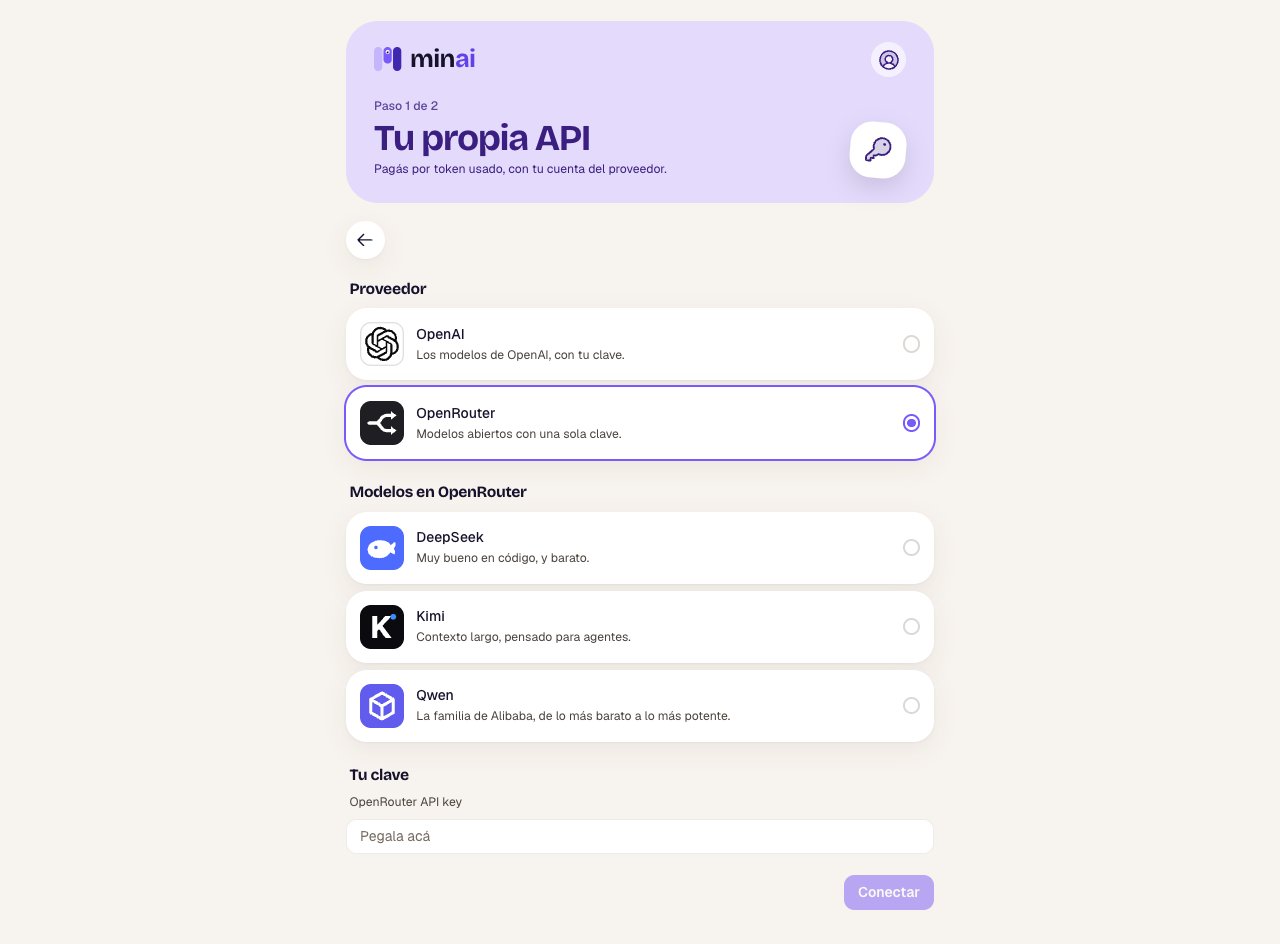 | Part | What it is |
| - | - |
| **Provider** | **OpenAI** (“OpenAI's models, with your key.”) or **OpenRouter** (“Open models with a single key.”). |
| **Models on OpenRouter** | Only with OpenRouter: **DeepSeek**, **Kimi** or **Qwen**, each with a line about what it's good for. |
| **Your key** | You paste the key from your provider account. If there's one already: “It's already saved. Paste another one only if you want to change it.” |
| **Connect** / **Save** | Tests the key (“Testing the key with…”) and saves it. |
| **Disconnect** | Asks you to confirm: the agents that think with this API stop answering until you pick another AI for them, and the key is deleted. |
If something doesn't work, it tells you why: the provider didn't accept the key, it has no balance (“Add credit in your provider account.”), that model isn't available, or the provider didn't answer.
## Try minai
Only during the free trial. “No subscription or key: minai provides the AI while your trial lasts.” The **minai's AI** card — “To start right away, with nothing to set up.” — with **Connect** or **Disconnect**.
Your own API and minai's AI can't be connected at the same time. If you connect one while you have the other, it asks whether you want to **Replace** it: the agents that used the old one move to the new one.
What suits each case.
Choose the AI and level for each one.
This documentation is built and hosted on [Mintlify](https://mintlify.com), a developer documentation platform.
| Part | What it is |
| - | - |
| **Provider** | **OpenAI** (“OpenAI's models, with your key.”) or **OpenRouter** (“Open models with a single key.”). |
| **Models on OpenRouter** | Only with OpenRouter: **DeepSeek**, **Kimi** or **Qwen**, each with a line about what it's good for. |
| **Your key** | You paste the key from your provider account. If there's one already: “It's already saved. Paste another one only if you want to change it.” |
| **Connect** / **Save** | Tests the key (“Testing the key with…”) and saves it. |
| **Disconnect** | Asks you to confirm: the agents that think with this API stop answering until you pick another AI for them, and the key is deleted. |
If something doesn't work, it tells you why: the provider didn't accept the key, it has no balance (“Add credit in your provider account.”), that model isn't available, or the provider didn't answer.
## Try minai
Only during the free trial. “No subscription or key: minai provides the AI while your trial lasts.” The **minai's AI** card — “To start right away, with nothing to set up.” — with **Connect** or **Disconnect**.
Your own API and minai's AI can't be connected at the same time. If you connect one while you have the other, it asks whether you want to **Replace** it: the agents that used the old one move to the new one.
What suits each case.
Choose the AI and level for each one.
This documentation is built and hosted on [Mintlify](https://mintlify.com), a developer documentation platform.