> ## Documentation Index
> Fetch the complete documentation index at: https://docs.min-ai.ar/llms.txt
> Use this file to discover all available pages before exploring further.
# Settings: Notifications
> Notifications on this device, installing the app, and which agent passes minai's notices on through its chat.
How you find out what's going on: notifications on this device and notices through an agent's chat.
**How to get there:** **Settings** → **Notifications**.
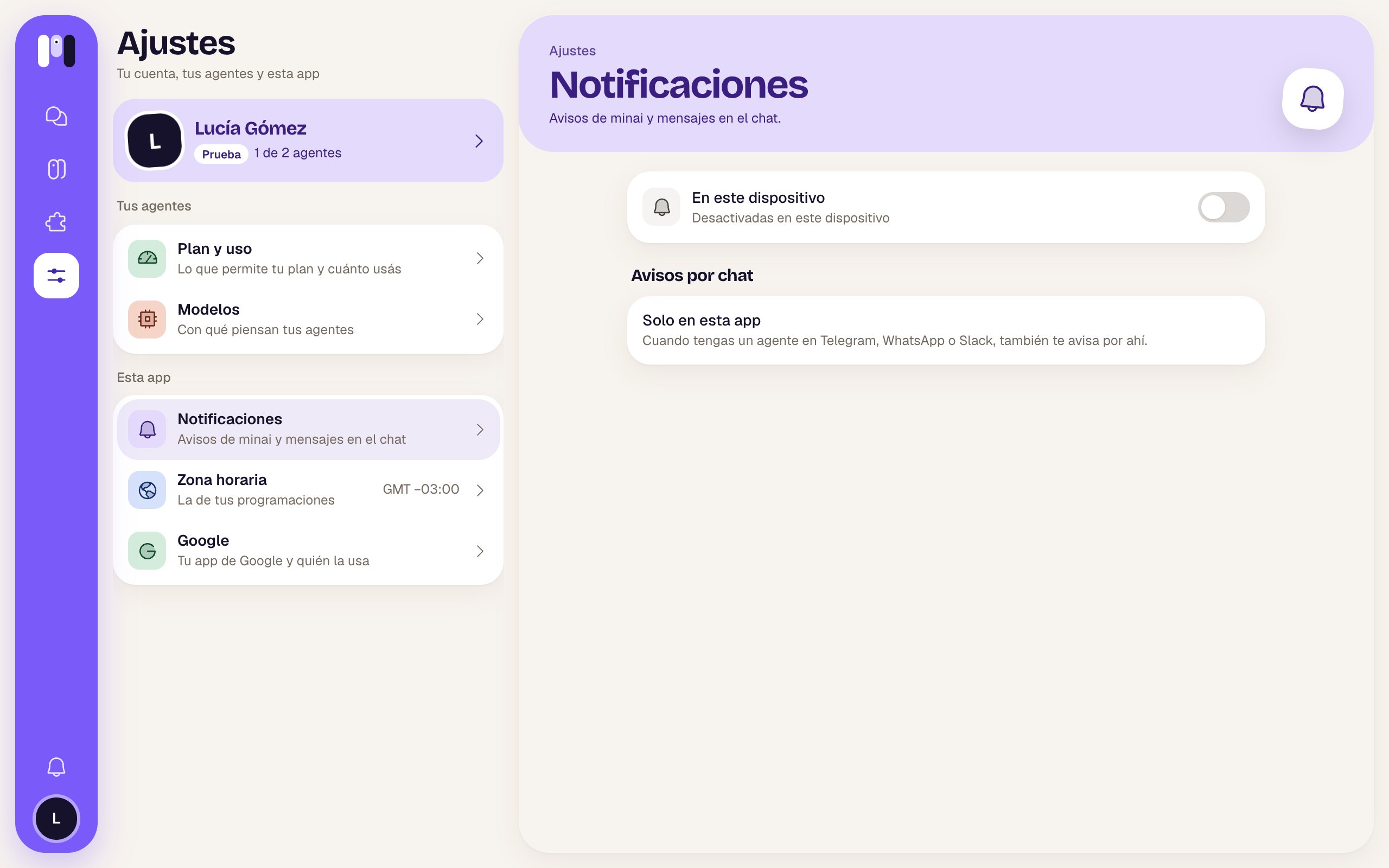 ## On this device
A switch, **Notifications on this device**, and below it how they're set:
| Status | What to do |
| - | - |
| “On for this device” | Nothing. |
| “Off for this device” | Turn on the switch. The browser asks at the top, next to the address: choose **Allow**. |
| “Blocked in the browser: allow them in its settings” | You blocked them before: allow them in the browser's settings for this site. |
| “This browser doesn't support them” | Try another browser. |
| “On iPhone, install minai first” | On iPhone they only arrive if you installed the app. |
They apply to this device only: you turn them on separately on each phone or computer. You get minai chat messages and minai's notices (Telegram, WhatsApp and Slack chats notify you from their own app). While you have a chat open on screen, that chat doesn't notify you.
## Install minai
* **On a phone**, if you haven't installed it, there's a pinned **“Install minai on your phone”** card at the top: tap it and it shows you the steps for your browser.
* **On a computer**, if the browser allows it, an **Install minai** row — “As an app, with its icon” — with the **Install** button.
See [Install the app](/en/setup/install-the-app).
## Notices by chat
Besides here, an agent that talks on Telegram, WhatsApp or Slack can pass [minai's notices](/en/reference/screens/notices) on to you through its chat.
* If you have one: the “Clara lets you know” row with its channel. Tap it to choose another in **“Who lets you know?”** — “They tell you in their chat what happens with your plan, your subscription and your channels.”
* If you don't have any: **Only in this app** — “Once you have an agent on Telegram, WhatsApp or Slack, it lets you know there too.”
The notice arrives in its chat like this: “**Notice from minai:** ” and the title, with the details below.
What minai can tell you about.
On iPhone, Android and a computer.
This documentation is built and hosted on [Mintlify](https://mintlify.com), a developer documentation platform.
## On this device
A switch, **Notifications on this device**, and below it how they're set:
| Status | What to do |
| - | - |
| “On for this device” | Nothing. |
| “Off for this device” | Turn on the switch. The browser asks at the top, next to the address: choose **Allow**. |
| “Blocked in the browser: allow them in its settings” | You blocked them before: allow them in the browser's settings for this site. |
| “This browser doesn't support them” | Try another browser. |
| “On iPhone, install minai first” | On iPhone they only arrive if you installed the app. |
They apply to this device only: you turn them on separately on each phone or computer. You get minai chat messages and minai's notices (Telegram, WhatsApp and Slack chats notify you from their own app). While you have a chat open on screen, that chat doesn't notify you.
## Install minai
* **On a phone**, if you haven't installed it, there's a pinned **“Install minai on your phone”** card at the top: tap it and it shows you the steps for your browser.
* **On a computer**, if the browser allows it, an **Install minai** row — “As an app, with its icon” — with the **Install** button.
See [Install the app](/en/setup/install-the-app).
## Notices by chat
Besides here, an agent that talks on Telegram, WhatsApp or Slack can pass [minai's notices](/en/reference/screens/notices) on to you through its chat.
* If you have one: the “Clara lets you know” row with its channel. Tap it to choose another in **“Who lets you know?”** — “They tell you in their chat what happens with your plan, your subscription and your channels.”
* If you don't have any: **Only in this app** — “Once you have an agent on Telegram, WhatsApp or Slack, it lets you know there too.”
The notice arrives in its chat like this: “**Notice from minai:** ” and the title, with the details below.
What minai can tell you about.
On iPhone, Android and a computer.
This documentation is built and hosted on [Mintlify](https://mintlify.com), a developer documentation platform.