> ## Documentation Index
> Fetch the complete documentation index at: https://docs.min-ai.ar/llms.txt
> Use this file to discover all available pages before exploring further.
# Settings: Plan and usage
> Your plan, how much of each thing you use, your AI subscription's quotas and what happens when your agents are stopped.
What your plan allows, how much you're using, and how to change plans or pay.
**How to get there:** **Settings** → **Plan and usage**. Also from the **Usage** section of an agent's overview, or from a notice.
 ## Your plan
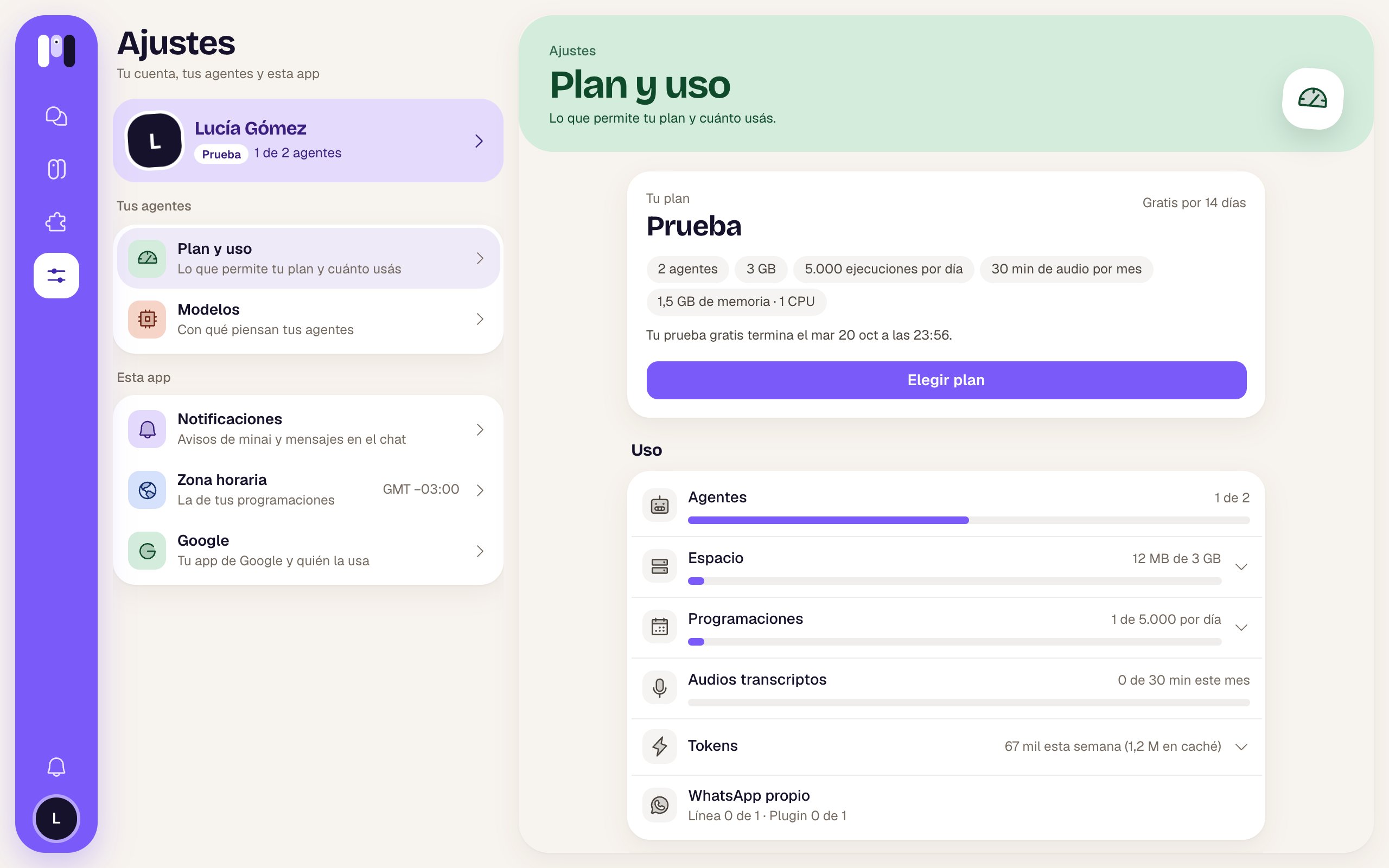
A card with:
| Part | What it is |
| - | - |
| Name | The plan (or “No plan”). On the right, the price, or “Free for 14 days” during the trial. |
| Tags | What it includes: agents, GB of space, runs a day, audio minutes a month, and memory and processor. |
| A status line | “Your free trial ends…”, “It renews on…”, “You cancelled it: it ends on…”, “Your plan is managed by…”, “A plan minai gave you.” or “Choose a plan to get started.” |
It can also show:
* “We couldn't charge your plan. We'll try again in a few days; check your card.”
* A move to a smaller plan that's already scheduled: “You move to … on …” and “By then you have to be within its limits.”, with **Undo**.
The buttons:
| Button | When | What it does |
| - | - | - |
| **Choose plan** | During the trial, with no plan, or when your plan has ended. | Opens “Choose your plan”. |
| **Change plan** | With a paid plan running. | Opens “Change plan”. |
| **Payments and invoices** | With a paid plan. | Opens the payments page: your card, your invoices and cancelling. |
## Choosing or changing plans
The window has **Monthly** / **Yearly** (with “1 month free” on the yearly one) and a card for each plan, with what it includes and its price; yours says “Your plan”.
* To choose: “If you have a discount code, you enter it when paying.” and **Go to payment**, which takes you to pay. When you come back: “Confirming your payment…”.
* To change: **Next** shows you what happens before you confirm. To a bigger one, you move now and pay the difference; to a smaller one, you move at the end of your period, and by that date you have to be within its limits. **Confirm** applies it.
## Your plan
A card with:
| Part | What it is |
| - | - |
| Name | The plan (or “No plan”). On the right, the price, or “Free for 14 days” during the trial. |
| Tags | What it includes: agents, GB of space, runs a day, audio minutes a month, and memory and processor. |
| A status line | “Your free trial ends…”, “It renews on…”, “You cancelled it: it ends on…”, “Your plan is managed by…”, “A plan minai gave you.” or “Choose a plan to get started.” |
It can also show:
* “We couldn't charge your plan. We'll try again in a few days; check your card.”
* A move to a smaller plan that's already scheduled: “You move to … on …” and “By then you have to be within its limits.”, with **Undo**.
The buttons:
| Button | When | What it does |
| - | - | - |
| **Choose plan** | During the trial, with no plan, or when your plan has ended. | Opens “Choose your plan”. |
| **Change plan** | With a paid plan running. | Opens “Change plan”. |
| **Payments and invoices** | With a paid plan. | Opens the payments page: your card, your invoices and cancelling. |
## Choosing or changing plans
The window has **Monthly** / **Yearly** (with “1 month free” on the yearly one) and a card for each plan, with what it includes and its price; yours says “Your plan”.
* To choose: “If you have a discount code, you enter it when paying.” and **Go to payment**, which takes you to pay. When you come back: “Confirming your payment…”.
* To change: **Next** shows you what happens before you confirm. To a bigger one, you move now and pay the difference; to a smaller one, you move at the end of your period, and by that date you have to be within its limits. **Confirm** applies it.
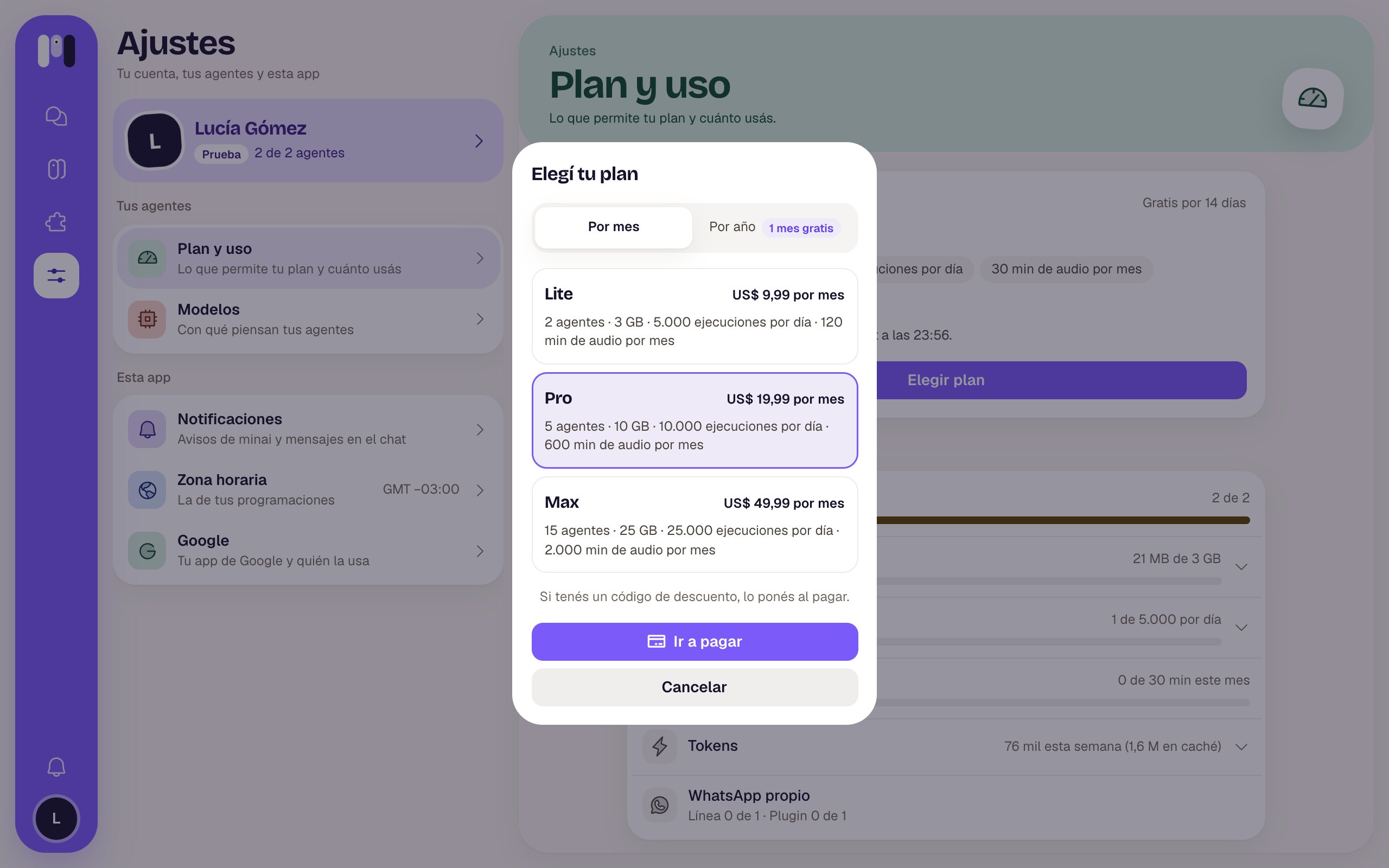 Prices and what each plan includes are in [Plans](/en/reference/plans). Step by step: [Plan and billing](/en/setup/plan-and-billing).
## Usage
One meter per thing. The minai symbol looks surprised when you pass 80% and gets angry if you went over; the number turns red.
| Meter | What it measures | Expands to show |
| - | - | - |
| **Agents** | “1 of 2”, and how many are paused (they count too). | — |
| **Space** | What they take up, in MB or GB, out of what your plan allows. | Per agent, and **Shared**: the programs your agents use. |
| **Schedules** | The runs on the busiest day, out of what your plan allows per day. | Per agent: how many schedules and how many a day; tap to go to theirs. |
| **Transcribed audio** | Audio minutes used this month. | — |
| **Tokens** | How much your agents thought this week (and how much came from cache). There's no limit on it in your plan. | Per agent, with bars. |
| **Own WhatsApp** | “Line 0 of 1 · Plugin 0 of 1”: your own line for agents and the WhatsApp plugin. “Over” if you went past it. | — |
## Your subscription
If your agents think with your Claude or ChatGPT account, this section shows up with its two quotas:
| Window | What it is |
| - | - |
| **Every 5 hours** | What's used in the current block, with “renews today at 15:20”, “tomorrow at…” or the day. |
| **Week** | What's used in the week, with when it renews. |
If one hits the cap, it says **No usage left** and “Your Claude agents can't work until it renews…”. Wait until the time it says, or move an agent to another AI from its [Model](/en/reference/screens/agent-model). We let you know at 80% and at 95%.
## When your agents are stopped
At the top, a red **“Your agents are stopped”** card shows up with the reason. Meanwhile, the agents don't answer or run their schedules.
| Reason | What to do |
| - | - |
| “Your trial ended: choose a plan to keep them going. Otherwise, your agents and their data are deleted…” | **Choose plan**. |
| “We couldn't charge your plan: choose it again to keep them going…” | Check your card in **Payments and invoices** or choose the plan again. |
| “Your plan ended: choose one to keep them going…” | **Choose plan**. |
| “You have more agents and more space than your plan allows. Once you're back within your plan, they carry on by themselves.” (or more schedules, or more WhatsApp) | Cut back what's over (delete an agent, free up space, ask the agent for fewer schedules) or move to a bigger plan. They carry on by themselves once you're within it. |
If 5 days go by without a plan, your agents and their data are deleted. We let you know beforehand in [Notices](/en/reference/screens/notices).
Each plan's prices and limits.
Choose, change or cancel.
This documentation is built and hosted on [Mintlify](https://mintlify.com), a developer documentation platform.
Prices and what each plan includes are in [Plans](/en/reference/plans). Step by step: [Plan and billing](/en/setup/plan-and-billing).
## Usage
One meter per thing. The minai symbol looks surprised when you pass 80% and gets angry if you went over; the number turns red.
| Meter | What it measures | Expands to show |
| - | - | - |
| **Agents** | “1 of 2”, and how many are paused (they count too). | — |
| **Space** | What they take up, in MB or GB, out of what your plan allows. | Per agent, and **Shared**: the programs your agents use. |
| **Schedules** | The runs on the busiest day, out of what your plan allows per day. | Per agent: how many schedules and how many a day; tap to go to theirs. |
| **Transcribed audio** | Audio minutes used this month. | — |
| **Tokens** | How much your agents thought this week (and how much came from cache). There's no limit on it in your plan. | Per agent, with bars. |
| **Own WhatsApp** | “Line 0 of 1 · Plugin 0 of 1”: your own line for agents and the WhatsApp plugin. “Over” if you went past it. | — |
## Your subscription
If your agents think with your Claude or ChatGPT account, this section shows up with its two quotas:
| Window | What it is |
| - | - |
| **Every 5 hours** | What's used in the current block, with “renews today at 15:20”, “tomorrow at…” or the day. |
| **Week** | What's used in the week, with when it renews. |
If one hits the cap, it says **No usage left** and “Your Claude agents can't work until it renews…”. Wait until the time it says, or move an agent to another AI from its [Model](/en/reference/screens/agent-model). We let you know at 80% and at 95%.
## When your agents are stopped
At the top, a red **“Your agents are stopped”** card shows up with the reason. Meanwhile, the agents don't answer or run their schedules.
| Reason | What to do |
| - | - |
| “Your trial ended: choose a plan to keep them going. Otherwise, your agents and their data are deleted…” | **Choose plan**. |
| “We couldn't charge your plan: choose it again to keep them going…” | Check your card in **Payments and invoices** or choose the plan again. |
| “Your plan ended: choose one to keep them going…” | **Choose plan**. |
| “You have more agents and more space than your plan allows. Once you're back within your plan, they carry on by themselves.” (or more schedules, or more WhatsApp) | Cut back what's over (delete an agent, free up space, ask the agent for fewer schedules) or move to a bigger plan. They carry on by themselves once you're within it. |
If 5 days go by without a plan, your agents and their data are deleted. We let you know beforehand in [Notices](/en/reference/screens/notices).
Each plan's prices and limits.
Choose, change or cancel.
This documentation is built and hosted on [Mintlify](https://mintlify.com), a developer documentation platform.