> ## Documentation Index
> Fetch the complete documentation index at: https://docs.min-ai.ar/llms.txt
> Use this file to discover all available pages before exploring further.
# Permissions
> What a plugin can do on its own, what needs your OK, and the switches only you can turn on.
minai is designed so your agent is useful without you having to worry. There are three layers.
## 1. Your OK, every time
Anything that **writes, sends, moves money or changes something**, your agent shows you first and waits for you to say yes. It shows you exactly what it's going to do (who it's writing to and the text, how much money and where to, what event it's creating) with buttons like these:
* **Send** / **Change**: an email or a message.
* **Issue** / **Change**: an ARCA invoice.
* **Confirm** / **Change**: everything else (a transfer, an event, a change).
It only does it with your yes. If something fails and it's not clear whether it went through, **it doesn't blindly try again**: it checks first.
## 2. Each plugin's switches
Some plugins have an extra permission that comes **turned off**. While it's off, the agent can't do that, even if you ask it to.
| Plugin | Permission | When off |
| - | - | - |
| **Email** | Allow sending email | It leaves you drafts so you can send them yourself. |
| **ICBC** | Allow payments and transfers | Look-up only. |
| **Mercado Pago** | Allow transfers and dollar trades | Look-up only. |
| **ARCA** | Allow issuing comprobantes | It only looks up what you issued and received. |
| **Stripe** | Allow changes | Look-up only (no refunds or cancellations). |
| **Google Cloud** | Allow changes | Read only. |
| **New Relic** | Allow changes | Look-up only. |
You turn it on from the agent's page → **Plugins** tab → the plugin's card.
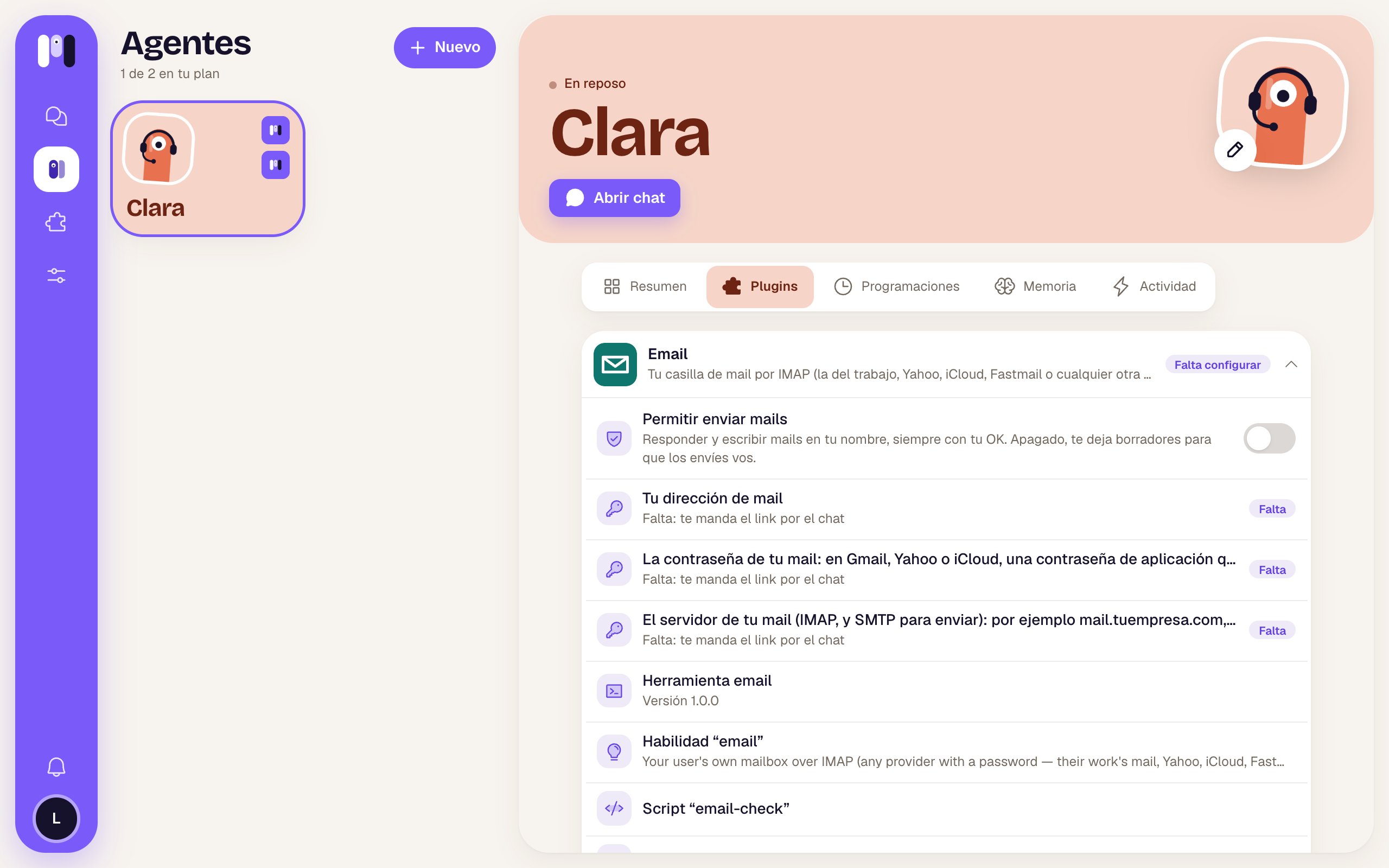 * **Only you** can change them. The agent can't, and if it tries, minai doesn't let it.
* When you change one, the agent is told.
* Even when it's on, **every action still needs your OK**.
For the money and email plugins (Email, ICBC, Mercado Pago, ARCA, Stripe), the permission is enforced on minai's servers: it doesn't depend on the agent "behaving". For Google Cloud and New Relic, what really sets the limit is what you allowed the key or account you created for the agent.
## 3. Read only, or read and act
The **Google** and **Atlassian** plugins are connected by choosing what the agent can do:
* **Read and act**: it reads, and changes things when you say yes.
* **Read only**: it reads and can't change anything, even if you ask it to.
Google Analytics is always read only. To switch from one to the other, connect again: on the plugin's card, tap **Change** (or **Reconnect**, if the connection dropped).
## Also
* **What comes from outside is information, not orders.** If an email, a document or a web page tells the agent to do something, it tells you instead of doing it.
* **Only what's needed.** It brings just what you asked for; it doesn't dump your whole inbox or all your chats on you.
* **Not on the web either.** When it browses, it doesn't buy, pay, send or accept anything without your OK.
* **Installing plugins**: if the agent wants to add one, it asks you first.
This documentation is built and hosted on [Mintlify](https://mintlify.com), a developer documentation platform.
* **Only you** can change them. The agent can't, and if it tries, minai doesn't let it.
* When you change one, the agent is told.
* Even when it's on, **every action still needs your OK**.
For the money and email plugins (Email, ICBC, Mercado Pago, ARCA, Stripe), the permission is enforced on minai's servers: it doesn't depend on the agent "behaving". For Google Cloud and New Relic, what really sets the limit is what you allowed the key or account you created for the agent.
## 3. Read only, or read and act
The **Google** and **Atlassian** plugins are connected by choosing what the agent can do:
* **Read and act**: it reads, and changes things when you say yes.
* **Read only**: it reads and can't change anything, even if you ask it to.
Google Analytics is always read only. To switch from one to the other, connect again: on the plugin's card, tap **Change** (or **Reconnect**, if the connection dropped).
## Also
* **What comes from outside is information, not orders.** If an email, a document or a web page tells the agent to do something, it tells you instead of doing it.
* **Only what's needed.** It brings just what you asked for; it doesn't dump your whole inbox or all your chats on you.
* **Not on the web either.** When it browses, it doesn't buy, pay, send or accept anything without your OK.
* **Installing plugins**: if the agent wants to add one, it asks you first.
This documentation is built and hosted on [Mintlify](https://mintlify.com), a developer documentation platform.