> ## Documentation Index
> Fetch the complete documentation index at: https://docs.min-ai.ar/llms.txt
> Use this file to discover all available pages before exploring further.
# Your Google app
> The one-time step to connect Gmail, Calendar, Drive, Docs, Analytics and Search Console: creating your own Google app.
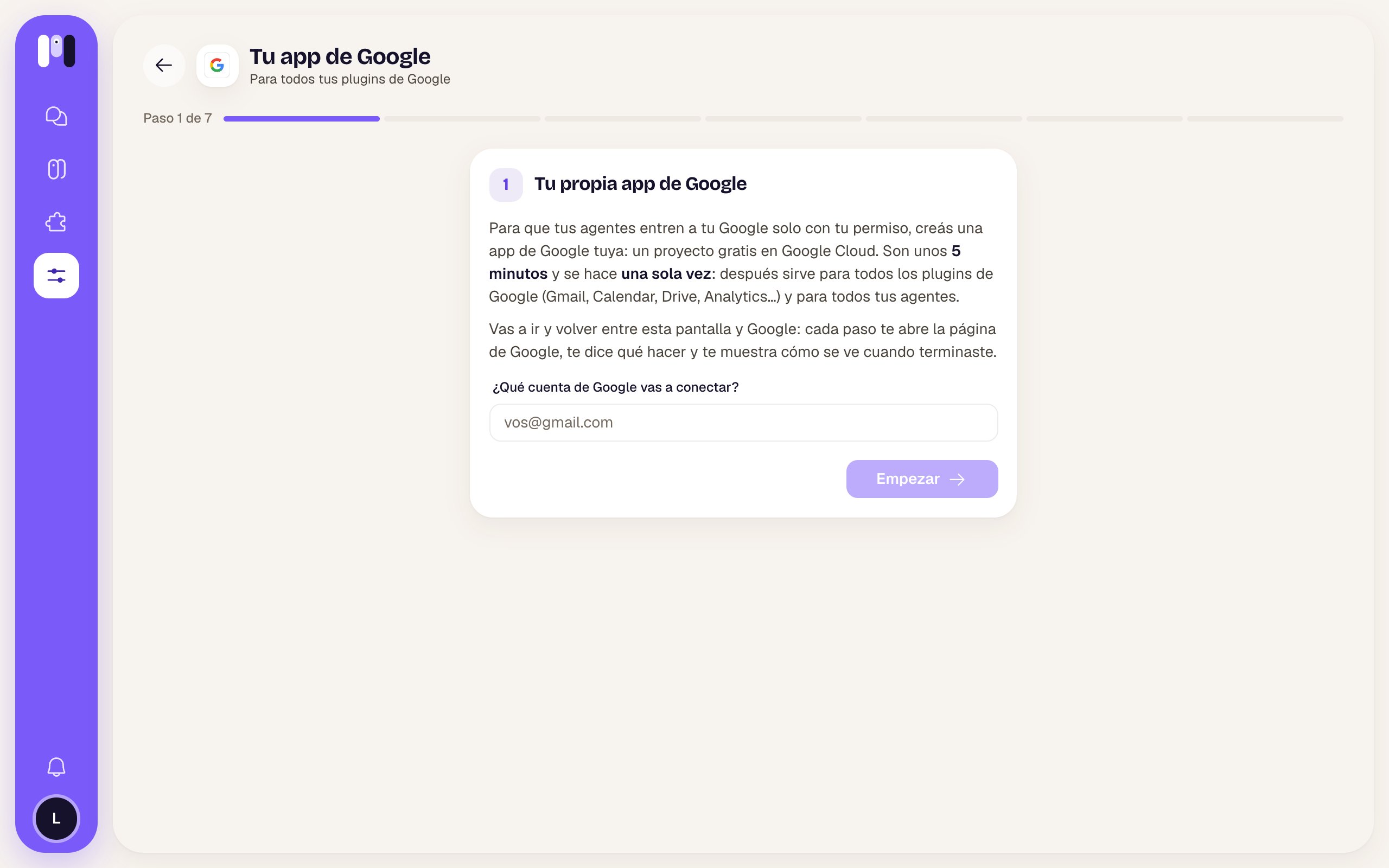
So your agents can get into your Google account only with your permission, you create **your own Google app**: a free Google Cloud project, in your name. It takes about **5 minutes** and you do it **only once**: after that it works for all the Google plugins and all your agents.
 ## Where you do it
* When you add your first Google plugin, the installer starts here.
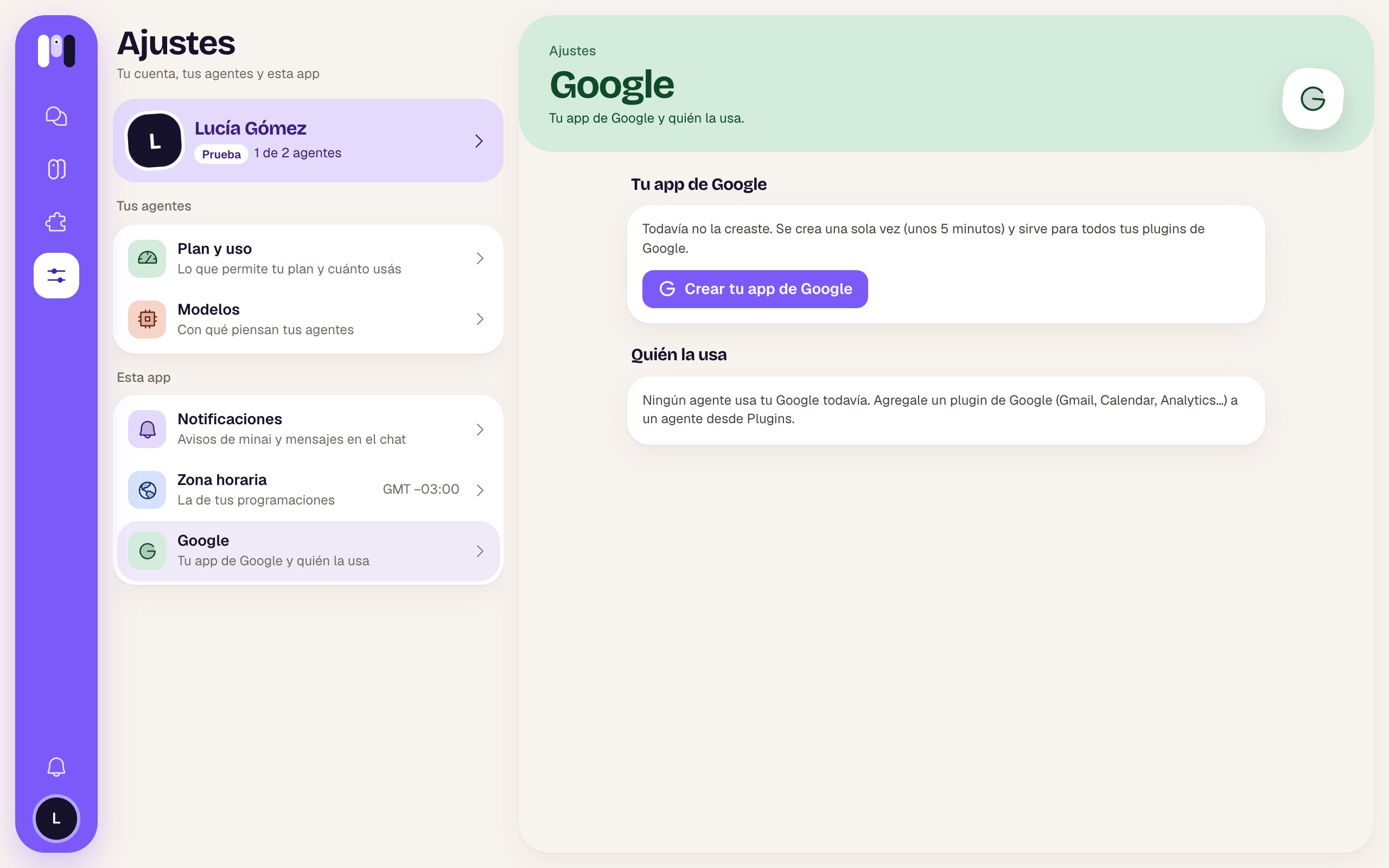
* Or beforehand, from **Settings → Google → Create your Google app**.
Do it on a computer: Google's console is awkward on a phone. If you started on your phone, copy the link and open it on your computer: you pick up where you left off.
The installer guides you step by step: each step opens the right Google page, tells you what to tap and shows you what it looks like when you're done. If you get stuck, on a computer you have **Ask** your agent, which opens its chat on the side.
## The steps
Type the account you're going to connect. If it's your company's or your domain's, mark it as a **Google Workspace** account (a couple of steps change).
In Google Cloud, a project called **minai**. Copy its ID and paste it in minai.
It's what Google shows you when you connect. Name **minai**, your email, audience **External** (or **Internal** on Workspace).
You paste three minai links (home, privacy and terms) and the **min-ai.ar** domain. Don't upload a logo: Google would ask to verify the app.
Tap **Publish app**. Google says it should be verified: there's no need, it's yours and only you use it. Publishing it keeps the connection from dropping after 7 days. On Workspace, you skip this step.
A client of type **Web application** with the address minai gives you. Before closing, tap **Download JSON**: Google won't show you the secret again afterwards.
Tap **Upload the JSON**. minai tests it with Google and stores it: “Your Google app is ready.”
## Then, for each Google plugin
With your app ready, each plugin only needs two things, inside its installer:
1. **Turn on its API** in your project (a direct link and **Enable**). For example, the Gmail API for Gmail; Docs needs the Docs one and the Drive one.
2. **Connect your account**: you choose **Read and act** or **Read only** and tap **Connect with Google**.
Google will show you “Google hasn't verified this app”. That's expected: the app is yours (your email shows as the developer). Tap **Advanced → Go to min-ai.ar (unsafe)**. If the permission has a checkbox, **check it** (it comes unchecked) and tap **Continue**.
## Who uses it
In **Settings → Google** you see your app (with its project and when you created it) and which agents use your Google account, with which account and which permission. From there you can also **Replace** it.
## Where you do it
* When you add your first Google plugin, the installer starts here.
* Or beforehand, from **Settings → Google → Create your Google app**.
Do it on a computer: Google's console is awkward on a phone. If you started on your phone, copy the link and open it on your computer: you pick up where you left off.
The installer guides you step by step: each step opens the right Google page, tells you what to tap and shows you what it looks like when you're done. If you get stuck, on a computer you have **Ask** your agent, which opens its chat on the side.
## The steps
Type the account you're going to connect. If it's your company's or your domain's, mark it as a **Google Workspace** account (a couple of steps change).
In Google Cloud, a project called **minai**. Copy its ID and paste it in minai.
It's what Google shows you when you connect. Name **minai**, your email, audience **External** (or **Internal** on Workspace).
You paste three minai links (home, privacy and terms) and the **min-ai.ar** domain. Don't upload a logo: Google would ask to verify the app.
Tap **Publish app**. Google says it should be verified: there's no need, it's yours and only you use it. Publishing it keeps the connection from dropping after 7 days. On Workspace, you skip this step.
A client of type **Web application** with the address minai gives you. Before closing, tap **Download JSON**: Google won't show you the secret again afterwards.
Tap **Upload the JSON**. minai tests it with Google and stores it: “Your Google app is ready.”
## Then, for each Google plugin
With your app ready, each plugin only needs two things, inside its installer:
1. **Turn on its API** in your project (a direct link and **Enable**). For example, the Gmail API for Gmail; Docs needs the Docs one and the Drive one.
2. **Connect your account**: you choose **Read and act** or **Read only** and tap **Connect with Google**.
Google will show you “Google hasn't verified this app”. That's expected: the app is yours (your email shows as the developer). Tap **Advanced → Go to min-ai.ar (unsafe)**. If the permission has a checkbox, **check it** (it comes unchecked) and tap **Continue**.
## Who uses it
In **Settings → Google** you see your app (with its project and when you created it) and which agents use your Google account, with which account and which permission. From there you can also **Replace** it.
 This documentation is built and hosted on [Mintlify](https://mintlify.com), a developer documentation platform.