

Asking it for a schedule
It can be one time (a date and time; once it’s passed, it deletes itself) or repeating (every day, on Mondays, every two hours…). Times are in your time zone.- “Remind me tomorrow at 9 to call the accountant.”
- “Every Monday at 8, send me a summary of my unread emails.”
- “Every 2 hours, from 9 to 17, check if the website is up and only tell me if it goes down.”
- “On the last Friday of every month, remind me to pay the rent.”
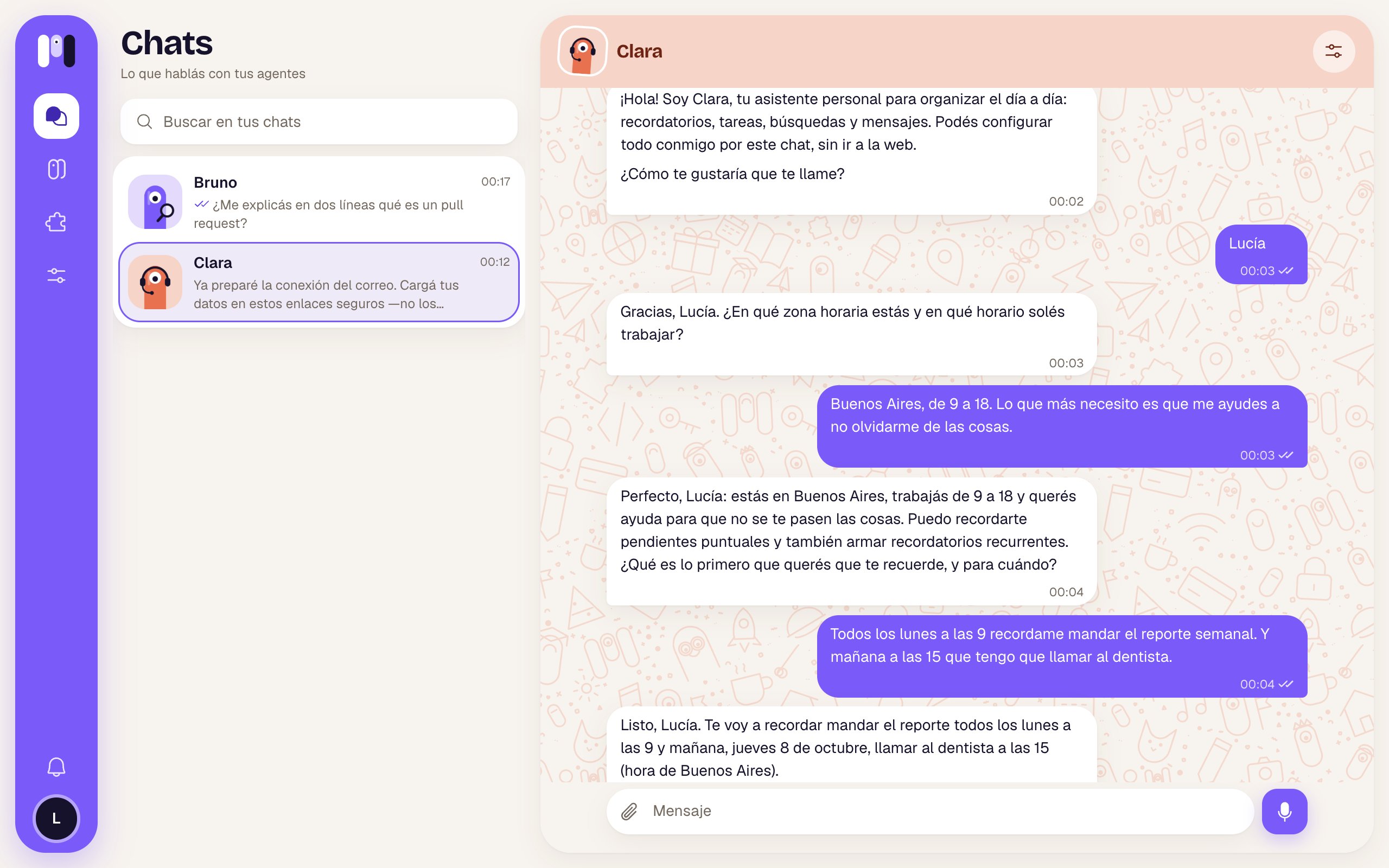
Clara sets up a reminder from the chat
Changing or canceling them by chatting
- “Move the gym reminder to 19:00.”
- “Cancel the Monday one.”
- “What do you have scheduled?”
The Schedules tab
In the agent, the Schedules tab (or the Scheduled count in Overview), you see everything it has scheduled, with the timing in words (“every 2 hours, from 9:00 to 17:00”). If there’s nothing: “Nothing scheduled”.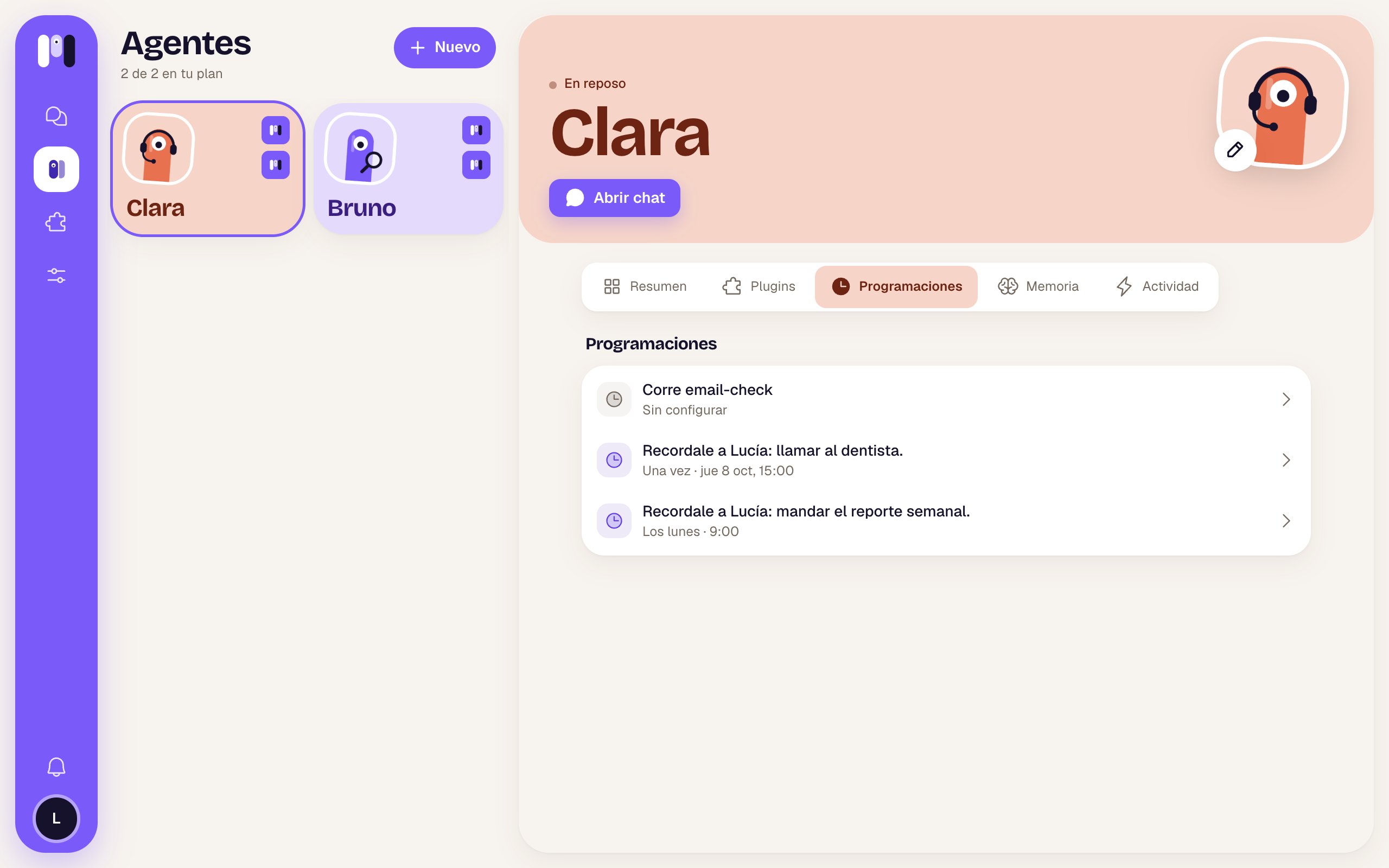
Clara's schedules
- Active: the switch to pause it (“Paused until you turn it on”) or turn it back on (“It runs on time”). A paused one shows Paused in the list.
- Delete schedule: it asks “Delete this schedule?”. Your agent stops doing it.
Plugin schedules
Some plugins come with their own schedule, like the new email notice from Gmail. They work a bit differently:- They come turned off and say Not set up: “Agree with Clara how often: it sets it up and turns it on from the chat.”
- They can be paused, but not deleted: “It belongs to the Gmail plugin: it goes when you remove it.”
- Some have a fixed timing and say “The plugin runs it”.
Only telling you when something happens
For frequent checks (whether a website is up, whether a price dropped, whether a payment arrived), your agent can make a small program that runs on its own on time and wakes it up only if there’s something to tell you. That way it doesn’t fill your chat with “all good”.- “Every 10 minutes, check if my website responds. Only tell me if it goes down.”
- “Every day at 10, get the official dollar rate and tell me if it goes over 1,500.”
Having another service notify it (webhooks)
Your agent can also create a web address so another service can notify it when something happens: Stripe when a payment comes in, GitHub when there’s a change, a form when someone fills it in. When the notice arrives, it wakes up and does what you agreed on.- “Make a webhook so Stripe tells you about every payment, and let me know.”
- “When someone fills in the contact form, send me a summary.”
Good to know
- If you pause the agent, it doesn’t run its schedules until you resume it.
- They count toward your plan as runs per day: each schedule counts the times it runs on its busiest day. If you go over, your agent tells you and you work it out together. See Plans.
- If your AI subscription ran out of usage, the schedules that fall in that window are skipped.
- Times follow your account’s time zone (Settings → Time zone).
Talk and remember
Your agent’s conversation and memory.
Stop, restart and pause
What happens to its schedules when you pause it.